



 Cadillac Escalade: Hitch Cover (without Dual Exhaust)
The vehicle may have a hitch cover. To remove the hitch cover:
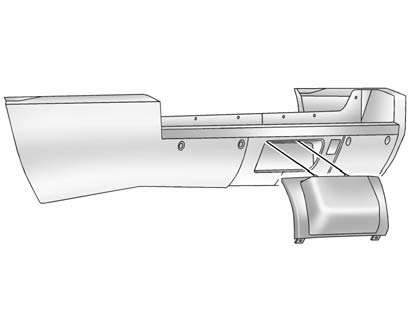
1. Turn the fasteners on the lower tabs 90 degrees counterclockwise.
2. Lift the lower edge of the cover about 45 degrees.
3. Pull the cover downward to disengage the upper attachments.
To reinstall the hitch cover:
1. Hold the cover at a 45 degree angle to the vehicle and push the upper tabs in the hitch cover into the chrome slots in the fascia.
2. Move the bottom of the cover forward until the lower tabs line up with the lower fascia slots.
3. Snap the hitch cover into place by pushing the upper corners forward.
4. Turn the fasteners on the lower tabs 90 degrees clockwise to lock the cover in place.
 Weight-Distributing Hitch Adjustment
A. Body to Ground Distance
B. Front of Vehicle
When using a weight-distributing hitch, the spring bars should be adjusted so
the distance (A) is the same after coupling the trailer to the tow veh ...
 Hitch Cover (with Dual Exhaust)
To remove the hitch cover:
1. Turn the fasteners on the lower tabs 90 degrees counterclockwise.
2. Pull the lower edge of the cover out slightly.
3. Lift the cover up off the upper bracket.
To r ...
See also:
Inserting the cargo tie down rings intothe mounting
WARNING
Distribute the load on the cargo tie down rings
evenly. Please observe the loading guidelines.
► Turn mounting element 2 in the loading
rail to .
► Insert cargo ...
Using the navigation system
WARNING
In the interests of safety, only operate, adjust or view the system when it is
safe to do so.
WARNING
The navigation system is not a substitute for driving safely, with due care ...
Call priority
When service calls are active, e.g. Roadside
Assistance or MB Info calls, an emergency
call can still be initiated. In this case, an
emergency call will take priority and override
all other active ...


