



 Mercedes-Benz GL-Class: Maximum tire pressure
WARNING 
Never exceed the maximum tire inflation
pressure. Follow recommended tire inflation
pressures.
Do not underinflate tires. Underinflated tires
wear excessively and/or unevenly, adversely
affect handling and fuel economy, and are
more likely to fail from being overheated.
Do not overinflate tires. Overinflated tires can
adversely affect handling and ride comfort,
wear unevenly, increase stopping distance,
and result in sudden deflation (blowout)
because they are more likely to become
punctured or damaged by road debris,
potholes etc.
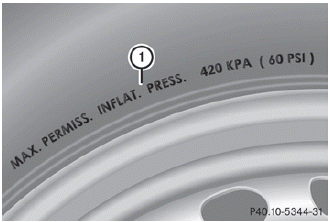
1 Maximum permitted tire pressure (example)
 The actual values for tires are specific to
each vehicle and may deviate from the
values in the illustration.
The actual values for tires are specific to
each vehicle and may deviate from the
values in the illustration.
When adjusting the tire pressures always observe the recommended tire pressure for your vehicle.
 Overinflated tires
WARNING
Follow recommended tire inflation pressures.
Do not overinflate tires. Overinflated tires can
adversely affect handling and ride comfort,
wear unevenly, increase stopping dista ...
 Checking the tire pressures
Important safety notes
WARNING
Follow recommended tire inflation pressures.
Do not underinflate tires. Underinflated tires
wear excessively and/or unevenly, adversely
affect handling ...
See also:
Maximum permissible gross vehicleweight rating
The specifications shown on the Tire and
Loading Information placard in the
illustration are examples. The maximum
permissible gross vehicle weight rating is
vehicle-specific and may differ from ...
Connecting booster cables
WARNING
Always wear appropriate eye protection when working with batteries.
Make sure both batteries are of the 12 volt type and that the booster cables
have insulated clamps and are approved ...
Vehicle Storage
Tires age when stored normally mounted on a parked vehicle. Park a vehicle that
will be stored for at least a month in a cool, dry, clean area away from direct
sunlight to slow aging. This area shou ...


