



 Mercedes-Benz GL-Class: Tail lamps with LEDs
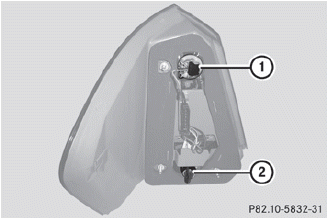
1 Rear fog lamp
2 Backup lamp
► Switch off the lights.
► Open the cargo compartment.
► Open the side trim panel.
► Turn the corresponding bulb holder
counter-clockwise and remove it.
► Remove the bulb from the bulb holder.
► Insert the new bulb into the bulb
holder.
► Insert the bulb holder and turn it
clockwise.
► Close the side trim panel.
 Opening and closing the side trimpanels
You must open the side trim panel in the
cargo compartment before you can change
the bulbs in the tail lamps.
Left-hand side trim panel
► To open: turn release knob 1 90° in the
directio ...
 License plate lamps
► Switch off the lights.
► Open the tailgate.
► Remove screws 1.
► Remove the license plate lamp.
► Replace the bulb.
► Insert the license plate lamp.
υ ...
See also:
On-Route
Select the On Route screen button to display all events ahead on the current
active route. If no traffic events have been reported on route, No Traffic Events
Reported On route displays.
Name
Pr ...
Battery Replacement
To change the remote control batteries:
1. Slide the rear cover back on the remote control.
2. Replace the two batteries in the compartment. Make sure they are installed
correctly using the diagram ...
Opening/closing automatically fromoutside
Important safety notes
WARNING
Make sure the tailgate is closed when the
engine is running and while driving. Among
other dangers, deadly carbon monoxide (CO)
gases may enter vehicle ...


