



 Mercedes-Benz GL-Class: Setting the side air vents
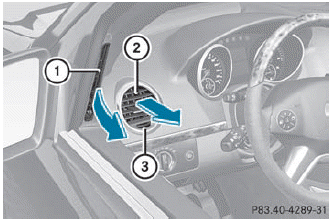
► To open/close: turn thumbwheel 3 to the left or right.
 Side window defroster vent 1 is never
completely shut, even if side air vent 2 is
shut.
Side window defroster vent 1 is never
completely shut, even if side air vent 2 is
shut.
 Setting the center air vents
1 Center air vent, left
2 Center air vent, right
3 Center vent thumbwheel, right
4 Center vent thumbwheel, left
► To open/close: turn thumbwheels 3 and 4
to the right or left. ...
 Setting the rear-compartment airvents
Setting the center vents in the rear
compartment
1 Rear-compartment air vent, left
2 Rear-compartment air vent, right
3 Rear control panel
When the climate control panel is switched
on/off, th ...
See also:
Door Locks
There are several ways to lock and unlock the vehicle.
From outside, use the Remote Keyless Entry (RKE) transmitter or the key in the
driver door.
From inside, use the power door locks or the manua ...
Roadside assistance program
In the event of a roadside emergency,
Roadside Assistance Service is available to
you. Please refer to your Warranty Information
Booklet (U.S.) or Warranty & Roadside
Assistance Informatio ...
How Does an Airbag Restrain?
In moderate to severe frontal or near frontal collisions, even belted occupants
can contact the steering wheel or the instrument panel.
In moderate to severe side collisions, even belted occupants ...


