



 Mercedes-Benz GL-Class: Tail lamps with LEDs
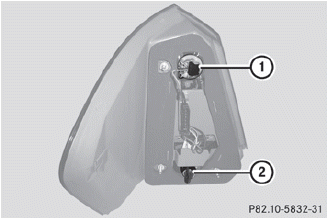
1 Rear fog lamp
2 Backup lamp
► Switch off the lights.
► Open the cargo compartment.
► Open the side trim panel.
► Turn the corresponding bulb holder
counter-clockwise and remove it.
► Remove the bulb from the bulb holder.
► Insert the new bulb into the bulb
holder.
► Insert the bulb holder and turn it
clockwise.
► Close the side trim panel.
 Opening and closing the side trimpanels
You must open the side trim panel in the
cargo compartment before you can change
the bulbs in the tail lamps.
Left-hand side trim panel
► To open: turn release knob 1 90° in the
directio ...
 License plate lamps
► Switch off the lights.
► Open the tailgate.
► Remove screws 1.
► Remove the license plate lamp.
► Replace the bulb.
► Insert the license plate lamp.
υ ...
See also:
Window reset
The windows will need to be reset if the battery is disconnected, becomes discharged
or power supply is interrupted.
Reset as follows:
1. Close the window fully.
2. Release the switch, then lift ...
Easy Exit Positions
This feature can move the driver seat rearward and the power steering column
up and forward to allow extra room to exit the vehicle.
: Press to recall the easy exit positions.
The vehicle must be i ...
Roof
Sunroof
The ignition must be in ON/RUN or ACC/ACCESSORY to operate the sunroof and power
sunshade.
See Retained Accessory Power (RAP) .
The vehicle may have a sunroof over the front seats and a r ...


