



 Mercedes-Benz GL-Class: Opening and closing the side trimpanels
You must open the side trim panel in the cargo compartment before you can change the bulbs in the tail lamps.
Left-hand side trim panel
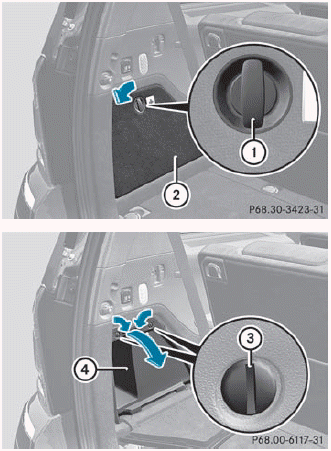
► To open: turn release knob 1 90° in the
direction of the arrow and remove side trim
panel 2.
► Insert a suitable object, e.g. a coin,
into the
slots of release knobs 3.
► Turn release knobs 3 90° in the direction
of the arrow and remove stowage
compartment 4.
► To close: insert stowage
compartment 4 and turn release
knobs 3 in the opposite direction to the
arrow until the slots on the release knobs
are in a vertical position.
► Insert side trim panel 2 and turn release knob 1 90° in the opposite direction to the arrow.
Right-hand side trim panel
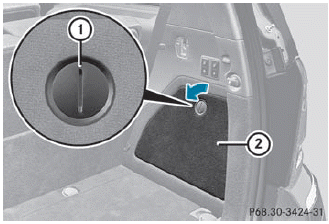
► To open: insert a suitable object, e.g.
a
coin, into the slot of release knob 1 on
side trim panel 2.
► Turn release knob 1
90° in the direction
of the arrow and remove side trim
panel 2.
► To close: insert side trim panel ; and
turn
release knob 1 90° in the opposite
direction to the arrow.

 Tail lamps with LEDs
1 Rear fog lamp
2 Backup lamp
► Switch off the lights.
► Open the cargo compartment.
► Open the side trim panel.
► Turn the corresponding bulb holder
counter-clockwise ...
See also:
Using the trip computer
A short press (1 second or less) or a series of short presses of the i button
will change the trip computer display. The options available are:
• Date and Odometer.
• Trip distance.
†...
Problems with fuel and the fuel tank
...
Activating/deactivating the MONOfunction
The MONO function is only available with
automatic climate control.18
You can use the MONO function to adopt the
settings configured for temperature, air
distribution and airflow on the driver's s ...


