



 Buick Enclave: Engine Compartment Overview
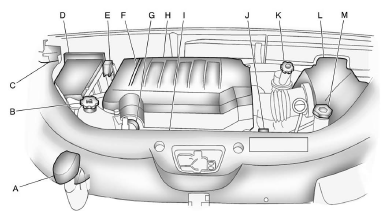
A. Radiator Pressure Cap. See Cooling System .
B. Engine Coolant Recovery Cap. See Cooling System .
C. Remote Negative (−) Terminal.
See Jump Starting .
D. Engine Compartment Fuse Block .
E. Remote Positive (+) Terminal.
See Jump Starting .
F. Power Steering Reservoir and Cap (under engine cover).
See Power Steering Fluid .
G. Engine Oil Fill Cap. See “When to Add Engine Oil” under Engine Oil .
H. Engine Cover .
I. Engine Oil Dipstick (out of view). See “Checking Engine Oil” under Engine Oil
.
J. Automatic Transmission Fluid Dipstick. See “Checking the Fluid Level” under Automatic
Transmission Fluid .
K. Brake Master Cylinder Reservoir. See “Brake Fluid” under Brakes .
L. Engine Air Cleaner/Filter .
M. Windshield Washer Fluid Reservoir. See “Adding Washer Fluid” under Washer Fluid
.
 Hood
Hood
To open the hood:
1. Pull the hood release handle with this symbol on it. It is located under the
instrument panel on the driver side of the vehicle.
2. At the front of the vehicle, pull up on ...
 Engine Cover
A. Oil Fill Cap
B. Engine Cover
To remove:
1. Remove the oil fill cap (A).
2. Raise the engine cover (B) to release it from the retainers.
3. Lift and remove the engine cover.
4. Reverse Steps ...
See also:
Engine Oil
To ensure proper engine performance and long life, careful attention must be
paid to engine oil. Following these simple, but important steps will help protect
your investment:
Always use engine ...
Radio Menu
Press CONFIG to enter the configure menu screen, then press CONFIG repeatedly
until Radio is selected or press the Radio screen button to make changes for radio
information displayed or to limit f ...
Locking and unlocking centrally
The SmartKey centrally locks/unlocks:
• the doors
• the tailgate
• the fuel filler flap
1 Locks the vehicle
2 Opens/closes the tailgate
3 Unlocks the vehicle
When unlocking, the turn ...


