



 Buick Enclave: Passenger Sensing System
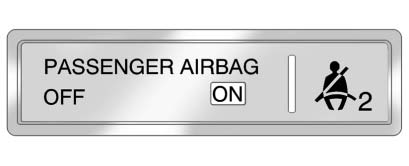
United States
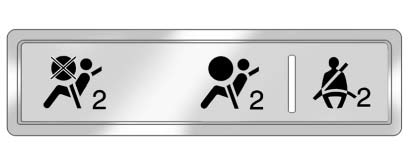
Canada and Mexico
The passenger sensing system will turn off the right front passenger frontal airbag under certain conditions. The driver airbag, seat-mounted side impact airbags, and roof-rail airbags are not affected by the passenger sensing system.
The passenger airbag status indicator will be visible on the instrument panel when the vehicle is started. See Passenger Sensing System for more information.
 Safety Belts
Refer to the following sections for important information on how to use safety
belts properly:
► Safety Belts.
► How to Wear Safety Belts Properly.
► Lap-Shoulder Belt ...
 Mirror Adjustment
Exterior Mirrors
To adjust each mirror:
1. Press (A) or (B) to select the mirror.
2. Press the control pad to adjust the mirror.
3. Press (A) or (B) again to deselect the mirror.
Folding Mirror ...
See also:
Underinflated tires
WARNING
Follow recommended tire inflation pressures.
Do not underinflate tires. Underinflated tires
wear excessively and/or unevenly, adversely
affect handling and fuel economy, and ar ...
Cadillac Technician Roadside Service (U.S. Only)
Cadillac's exceptional Roadside Service is more than an auto club or towing service.
It provides every Cadillac owner in the United States with the advantage of contacting
a Cadillac advisor and ...
Centrally locking and unlocking thevehicle from the inside
You can centrally lock or unlock the vehicle
from the inside.
The central locking/unlocking button does
not lock or unlock the fuel filler flap.
The buttons are located on both front doors.
...


