



 Mercedes-Benz GL-Class: Turn signal lamps/side marker lamps
► Switch off the lights.
► Open the hood.
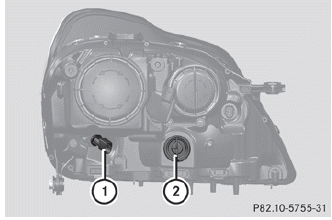
► Turn bulb holder 1 (WY 5 W)/2 (3457A)
counter-clockwise and pull it out.
► Remove the bulb from bulb holder 1/2.
► Insert the new bulb into bulb
holder 1/2.
► Insert bulb holder 1/2 and turn it
clockwise.
 Parking lamp/standing lamp
► Switch off the lights.
► Open the hood.
► Turn bulb holder 1 counter-clockwise and
pull it out.
► Take the bulb out of bulb holder 1.
► Insert the new bulb into ...

See also:
Brakes
This vehicle has disc brakes. Disc brake pads have built-in wear indicators that
make a high-pitched warning sound when the brake pads are worn and new pads are
needed. The sound can come and go or ...
Service Publications Ordering Information
Service Manuals
Service Manuals have the diagnosis and repair information on the engines, transmission,
axle, suspension, brakes, electrical, steering, body, etc.
Service Bulletins
Service Bulleti ...
Off-road recovery
If the right side or left side wheels
unintentionally leave the road surface,
maintain control of the vehicle by following
the procedure below. Please note that this
procedure is only a genera ...


