



 Mercedes-Benz GL-Class: Rear view camera
Important safety notes
The rear view camera is an optical parking aid.
It shows the area behind your vehicle in the COMAND display.
WARNING 
Make sure that no persons or animals are in
the maneuvering range. Otherwise, they
could be injured.
The rear view camera is located in the handle strip of the tailgate.
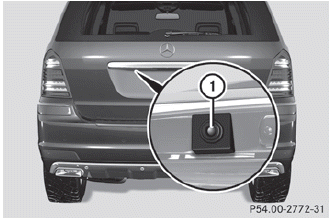
1 Rear view camera

 View through the camera
The area behind the vehicle is displayed as a
mirror image, as in the rear-view mirror.
WARNING
The rear view camera is only an aid and may
display obstacles
• from a distorted pers ...
See also:
Linking intelligent key
The Climate control system settings can be
memorized for each Intelligent Key. For
more details, see “Setting memory function”
in the “3. Pre-driving checks and
adjustments” section. ...
Cup holders
CAUTION
► Avoid abrupt starting and braking when
the cup holder is being used to prevent
spilling the drink. If the liquid is hot, it
can scald you or your passenger.
► Use onl ...
Cupholders
Cupholders are in the center console for the front passengers. Press down on
the access door release to open and use the front cupholders. Push the door back
down to close it. Push down and then bac ...


