



 Infiniti QX: Intelligent Key battery discharge
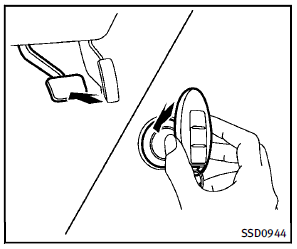
If the battery of the Intelligent Key is discharged, or environmental conditions interfere with the Intelligent Key operation, start the engine according to the following procedure: 1. Move the selector lever to the P (Park) position. 2. Firmly apply the foot brake. 3. Touch the ignition switch with the Intelligent Key as illustrated. (A chime will sound.)
4. Push the ignition switch while depressing the brake pedal within 10 seconds after the chime sounds. The engine will start. After step 3 is performed, when the ignition switch is pushed without depressing the brake pedal, the ignition switch position will change to ACC.
NOTE:
► When the ignition switch is pushed to
the ACC or ON position or the engine is
started by the above procedures, the
Intelligent Key battery discharge indicator
appears on the dot matrix liquid
crystal display even if the Intelligent
Key is inside the vehicle. This is not a
malfunction. To turn off the Intelligent
Key battery discharge indicator, touch
the ignition switch with the Intelligent
Key again.
► If the Intelligent Key battery discharge
indicator appears, replace the battery
as soon as possible. (See “Battery” in
the “8. Maintenance and do-it-yourself”
section.)
 Emergency engine shut off
To shut off the engine in an emergency
situation while driving, perform the following
procedure:
► Rapidly push the push-button ignition
switch 3 consecutive times in less than
1.5 sec ...
 Before starting the engine
► Make sure the area around the vehicle
is clear.
► Check fluid levels such as engine oil,
coolant, brake fluid and window
washer fluid as frequently as possible,
or at least whe ...
See also:
Camera cleanliness
If the color of the camera position arrow in the display changes from blue to
red, the system has detected that the camera is dirty. Clean the camera in accordance
with the guidelines given on pag ...
Instrument Panel
A. Air Vents .
B. Turn and Lane-Change Lever.
See Turn and Lane-Change Signals .
Windshield Wiper/Washer .
C. Instrument Cluster .
D. Driver Information Center (DIC) Buttons. See Driver Informa ...
Trailer towing
When you attach a trailer, make sure you have
correctly established the electrical
connection. This can be accomplished by checking the trailer lighting. In this
event,
Blind Spot Assist is deact ...


