



 Infiniti QX: Intelligent Cruise Control (ICC) system (if so equipped)
The Intelligent Cruise Control (ICC) system
automatically maintains a selected distance
from the vehicle traveling in front of
you according to that vehicle’s speed (up
to the set speed), or at the set speed when
the road ahead is clear.
The ICC function can be set to one of two
cruise control modes:
► Vehicle-to-vehicle distance control
mode:
For maintaining a selected distance
between your vehicle and the vehicle
in front of you up to the preset speed.
► Conventional (fixed speed) cruise control
mode:
For cruising at a preset speed.
 WARNING
► Always drive carefully and attentively
when using either cruise control mode.
Read and understand the Owner’s Manual
thoroughly before using the ICC
system. To avoid serious injury or death,
do not rely on the system to prevent
accidents or to control the vehicle’s
speed in emergency situations. Do not
use the ICC system except in appropriate
road and traffic conditions.
► In the conventional (fixed speed) cruise
control mode, a warning chime will not
sound to warn you if you are too close to
the vehicle ahead. Pay special attention
to the distance between your vehicle and
the vehicle ahead of you or a collision
could occur.
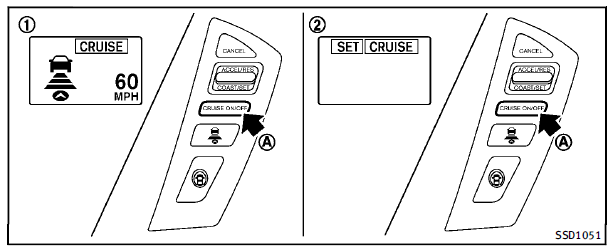
1. Vehicle-to-vehicle distance control
mode
2. Conventional (fixed speed) cruise control
mode
Push the MAIN switch A to choose the cruise control mode between the vehicleto- vehicle distance control mode 1 and the conventional (fixed speed) cruise control mode 2 . To choose the vehicle-to-vehicle distance control mode1 , quickly push and release the MAIN switch A . To choose the conventional (fixed speed) cruise control mode 2 , push and hold the MAIN switch A for longer than approximately 1.5 seconds. Once a control mode is activated, it cannot be changed to the other cruise control mode. To change the mode, push the MAIN switch once to turn the system off. Then push the MAIN switch again to turn the system back on and select the desired cruise control mode. Always confirm the setting in the ICC system display. For the vehicle-to-vehicle distance control mode, see the following description. For the conventional (fixed speed) cruise con trol mode, see “Conventional (fixed speed) cruise control mode” later in this section.
- Selecting vehicle-to-vehicle distance control mode
- Vehicle-to-vehicle distance control mode
- Precautions on vehicle-to-vehicle distance control mode
- Vehicle-to-vehicle distance control mode operation
- Conventional (fixed speed) cruise control mode
- Preview function (for Intelligent Cruise Control (ICC) system equipped model)
 Cruise control operations
The cruise control allows driving at a speed
between 25 to 90 MPH (40 to 144 km/h)
without keeping your foot on the accelerator
pedal.
To turn on the cruise control, push the
MAIN switch on. ...
 Selecting vehicle-to-vehicle distance control mode
To choose the vehicle-to-vehicle distance
control mode1 , quickly push and release
the MAIN switch A . ...
See also:
Spark plugs
WARNING
Be sure the engine and the ignition switch
are off and that the parking brake is
engaged securely.
CAUTION
Be sure to use the correct socket to remove
the spark plugs. An incorre ...
Preview function (for Intelligent Cruise Control (ICC) system equipped
model)
The Intelligent Cruise Control (ICC) system
with the preview function identifies the
need to apply emergency braking by
sensing the vehicle ahead in the same
lane and the distance to the vehic ...
Push-button ignition switch
WARNING
Do not operate the push-button ignition
switch while driving the vehicle except in an
emergency. (The engine will stop when the
ignition switch is pushed 3 consecutive
times or the ...


