



 Mercedes-Benz GL-Class: Hazard warning lamps
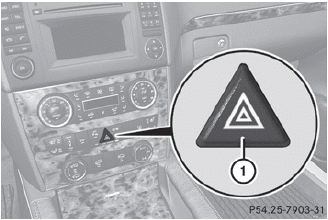
The hazard warning lamps automatically switch on if:
• an air bag is deployed.
• the vehicle is slowed down severely from a
speed of over 45 mph(70 km/h) and comes
to a halt.
► To switch on the hazard warning lamps:
press button 1.
All turn signals flash. If you now switch on a turn signal using the combination switch, only the turn signal lamp on the corresponding side of the vehicle will flash.
► To switch off the hazard warning lamps: press button 1.
The hazard warning lamps are deactivated automatically if the vehicle returns to a speed of over 6 mph(10 km/h) after a full application of the brakes.
 The hazard warning lamps still operate if
the ignition is switched off.
The hazard warning lamps still operate if
the ignition is switched off.
 High-beam flasher
► To switch on: turn the SmartKey in the
ignition lock to position 1 or 2 or start the
engine.
► Pull the combination switch in the
direction
of arrow 3. ...
 Active light function
The active light function is a system that
moves the headlamps according to the
steering movements of the front wheels. In
this way, relevant areas remain illuminated
while driving. This allows ...
See also:
Cruise control
Important safety notes
Cruise control maintains a constant road
speed for you. It brakes automatically in order
to avoid exceeding the set speed. On long and
steep downhill gradients, especially i ...
Vehicle loading information
WARNING
► It is extremely dangerous to ride
in a cargo area inside the vehicle.
In a collision, people riding in
these areas are more likely to be
seriously injured or killed.
υ ...
Security Light
The security light should come on briefly as the engine is started. If the system
is working normally, the indicator light turns off. If it does not come on, have
the vehicle serviced by your deal ...


