



 Infiniti QX: Automatic climate control
 WARNING
► The air conditioner cooling function
operates only when the engine is running.
► Do not leave children or adults who
would normally require the support of
others alone in your vehicle. Pets should
not be left alone either. On hot, sunny
days, temperatures in a closed vehicle
could quickly become high enough to
cause severe or possibly fatal injuries to
people or animals.
► Do not use the recirculation mode for
long periods as it may cause the interior
air to become stale and the windows to
fog up.
► Do not adjust the heating and air
conditioning controls while driving so
that full attention may be given to
vehicle operation.
Start the engine and operate the automatic climate control system.
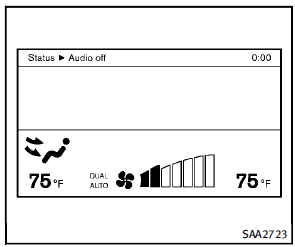
When the STATUS button is pushed, the automatic climate control status screen will appear. (See “How to use STATUS button” earlier in this section.)
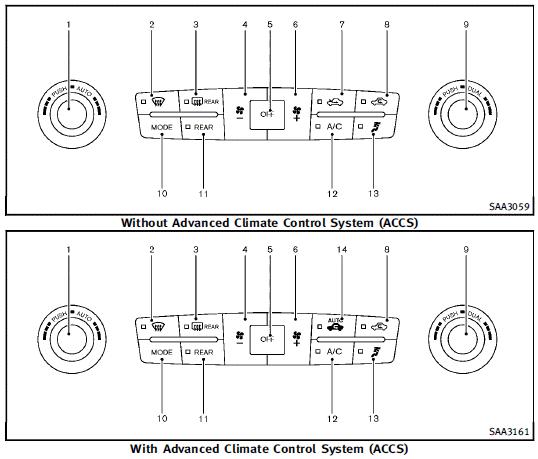
1. “AUTO” automatic climate control ON
button/Temperature control dial (driver
side)
2. “  ” front defroster button
3. “  ” rear window defroster button
(See “Rear window and outside mirror
defroster/windshield deicer switch” in
the “2. Instruments and controls”
section.)
” rear window defroster button
(See “Rear window and outside mirror
defroster/windshield deicer switch” in
the “2. Instruments and controls”
section.)
4. “  ” fan speed decrease button
5. “OFF” button for climate control system
6. “  ” fan speed increase button
7. “  ” intake air control button
8. “  ” air recirculation button
9. “DUAL” zone control ON/OFF button/
Temperature control dial (passenger
side)
10. “MODE” manual air flow control button
11. “REAR” control button
12. “A/C” air conditioner ON/OFF button
13. “  ” upper vent button
14. “  ” auto-recirculation button
- Automatic climate control
- Operating tips
- Linking intelligent key
- In-cabin microfilter
- Servicing climate control
 Ventilators
Center ventilators
Open/close the ventilators by moving the
control to either direction.
: This symbol indicates that the
ventilators are
closed. Moving the side control to this
direct ...
 Automatic climate control
Automatic operation
Cooling and/or dehumidified heating
(AUTO):
This mode may be used all year round. The
system works automatically to control the
inside temperature, air flow distribution
...
See also:
Where to Put the Restraint
According to accident statistics, children and infants are safer when properly
restrained in a child restraint system or infant restraint system secured in a rear
seating position.
We recommend tha ...
Cockpit
1. Instrument brightness control switch
(P.2-42)
2. TRIP/RESET switch for twin trip odometer
(P.2-7)
3. Headlight, fog light and turn signal
switch
— Headlight (P.2-38)
— Turn sign ...
Tire pressure
Tire Pressure Monitoring System
(TPMS)
This vehicle is equipped with the Tire
Pressure Monitoring System (TPMS). It
monitors tire pressure of all tires except
the spare. When the low tire pre ...


