



 Infiniti QX: Ventilators
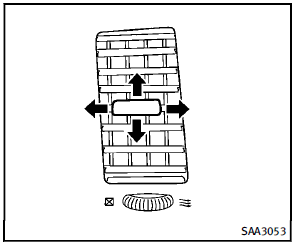
Center ventilators
Open/close the ventilators by moving the control to either direction.
 : This symbol indicates that the
ventilators are
closed. Moving the side control to this
direction will close the ventilators.
: This symbol indicates that the
ventilators are
closed. Moving the side control to this
direction will close the ventilators.
 : This symbol indicates that the
ventilators are
open. Moving the side control to this direction
will open the ventilators.
: This symbol indicates that the
ventilators are
open. Moving the side control to this direction
will open the ventilators.
Adjust the air flow direction of the ventilators by moving the center knob (up/down, left/right) until the desired position is achieved.
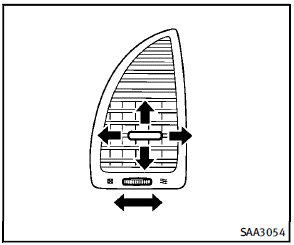
Side ventilators
Open/close the ventilators by moving the control to either direction.
: This symbol indicates that the
ventilators are
closed. Moving the side control to this
direction will close the ventilators.
: This symbol indicates that the
ventilators are
open. Moving the side control to this direction
will open the ventilators.
Adjust the air flow direction of the ventilators by moving the center knob (up/down, left/right) until the desired position is achieved.
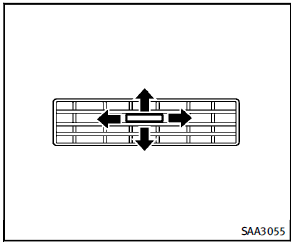
Rear ventilators
Open/close the ventilators by moving the control to either direction. Adjust the air flow direction of the ventilators by moving the center knob (up/down, left/right) until the desired position is achieved.
 Operating tips
► The screen displayed on the Around
View Monitor will automatically return
to the previous screen 3 minutes after
the CAMERA button has been pushed
while the selector lever is in a posi ...
 Automatic climate control
WARNING
► The air conditioner cooling function
operates only when the engine is running.
► Do not leave children or adults who
would normally require the support of
others alone ...
See also:
When reading the manual
This manual includes information for all
options available on this model. Therefore,
you may find some information that does
not apply to your vehicle.
All information, specifications and illu ...
Full screen view
The video media menu displays a small preview image of the video. Touch the preview
image to select full screen mode. The video media controls and the playback status
information are displayed for ...
After Off-Road Driving
Remove any brush or debris that has collected on the underbody or chassis, or
under the hood. These accumulations can be a fire hazard.
After operation in mud or sand, have the brake linings cleaned ...


