



 Cadillac Escalade: Windshield Wiper/Washer
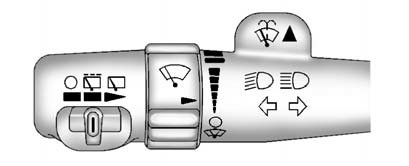
The front wiper control is located on the turn and lane-change lever.
Turn the band with the wiper symbol to control the windshield wipers.
 (Mist): For a single wipe, turn to
 , then release.
For several wipes, hold the band on
 longer.
 (Off): Turns the windshield wipers
off.
(Off): Turns the windshield wipers
off.
 (Adjustable Interval Wipes): Turn
the band up for more frequent wipes or down for less frequent wipes.
(Adjustable Interval Wipes): Turn
the band up for more frequent wipes or down for less frequent wipes.
 (Low Speed): Slow wipes.
 (High Speed): Fast wipes.
Clear ice and snow from the wiper blades before using them. If frozen to the windshield, carefully loosen or thaw them. Damaged wiper blades should be replaced. See Wiper Blade Replacement .
Heavy snow or ice can overload the wiper motor. A circuit breaker will stop the motor until it cools down.
Windshield Washer
 WARNING
In freezing weather, do not use the washer until the windshield is warmed. Otherwise the washer fluid can form ice on the windshield, blocking your vision.
 (Washer Fluid): Push the paddle
at the top of the multifunction lever, to spray washer fluid on the windshield.
The wipers clear the window and then either stop or return to the preset speed.
(Washer Fluid): Push the paddle
at the top of the multifunction lever, to spray washer fluid on the windshield.
The wipers clear the window and then either stop or return to the preset speed.
 Horn
Horn
To sound the horn, press the center pad on the steering wheel. ...
 Rear Window Wiper/Washer
The rear wiper control is located on the turn and lane-change lever.
To turn the rear wiper on, slide the lever to a wiper position.
(Off): Turns the wiper off.
(Rear Wiper Delay): Turns on the
...
See also:
Heated steering wheel
The heated steering wheel system is
designed to operate only when the surface
temperature of the steering wheel is below
688F (208C).
Push the heated steering wheel switch to
warm the stee ...
Displaying the digital speedometer oroutside temperature
If you have selected the digital speedometer
for the status bar, the outside
temperature is displayed here.
► Press the
button on the
steering wheel to select the standard
display.
...
Tire care
WARNING
Do not drive the vehicle if a tire is damaged, excessively worn, or incorrectly
inflated. A tire in such a condition may catastrophically fail and cause an accident.
Avoid contaminati ...


