



 Mercedes-Benz GL-Class: Turn signals
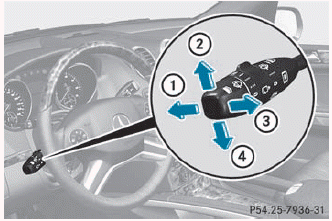
1 High-beam headlamps
2 Right turn signal
3 High-beam flasher
4 Left turn signal
► To indicate briefly: press the combination switch briefly to the pressure point in the direction of arrow 2 or 4.
The corresponding turn signal flashes three times.
► To indicate: press the combination switch beyond the pressure point in the direction of arrow 2 or 4.
► To switch on the high-beam headlamps:
turn the SmartKey in the ignition lock to position 2 or start the engine.
► Turn the light switch to
 .
.
► Press the combination switch beyond the pressure point in the direction of arrow 1.
The  indicator lamp in the
instrument
cluster lights up.
indicator lamp in the
instrument
cluster lights up.
► To switch off the high-beam headlamps: move the combination switch back to its normal position.
The  indicator lamp in the
instrument
cluster goes out.
indicator lamp in the
instrument
cluster goes out.

 High-beam flasher
► To switch on: turn the SmartKey in the
ignition lock to position 1 or 2 or start the
engine.
► Pull the combination switch in the
direction
of arrow 3. ...
See also:
Driver Information Center (DIC)
Your vehicle has a Driver Information Center (DIC).
The DIC displays information about your vehicle. It also displays warning messages
if a system problem is detected.
All messages will appear in ...
Resetting to factory settings
For safety reasons, the Daytime Running
Lamps function in the Lighting submenu is
only reset when the engine is switched off.
► Press
on the steering wheel
to select the Settings menu.
...
Limited Warranty
Follow the instructions in this manual
about the proper operation of your vehicle
as well as about possible vehicle damage.
Damage to your vehicle that arises from
culpable contraventions agai ...


