



 Mercedes-Benz GL-Class: Turn signal lamps/side marker lamps
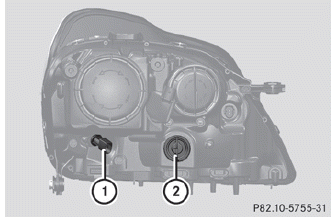
► Switch off the lights.
► Open the hood.
► Turn bulb holder 1 (WY 5 W)/2 (3457A)
counter-clockwise and pull it out.
► Remove the bulb from bulb holder 1/2.
► Insert the new bulb into bulb
holder 1/2.
► Insert bulb holder 1/2 and turn it
clockwise.
 Parking lamp/standing lamp
► Switch off the lights.
► Open the hood.
► Turn bulb holder 1 counter-clockwise and
pull it out.
► Take the bulb out of bulb holder 1.
► Insert the new bulb into ...

See also:
Immobilizer
See Radio Frequency Statement for information regarding Part 15 of the
Federal Communications Commission (FCC) rules and Industry Canada Standards RSS-GEN/210/220/310. ...
Remote control battery
The remote control battery is automatically recharged while the remote is docked.
The battery is not serviceable and should not be changed or removed by the user. ...
Checking the tire pressures
Important safety notes
WARNING
Follow recommended tire inflation pressures.
Do not underinflate tires. Underinflated tires
wear excessively and/or unevenly, adversely
affect handling ...


