



 Buick Enclave: Taillamps, Turn Signal, Sidemarker, and Stoplamps
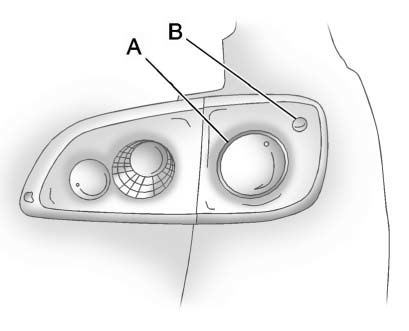
A. Taillamp
B. Sidemarker Lamp
To replace one of these bulbs:
1. Open the liftgate. See Liftgate .
2. Remove the black cuff from the lamp assembly by pulling rearward from the top
to unfasten it from the snap tabs.
3. Remove the two hex nuts holding the taillamp assembly in place.
4. Pull out the taillamp assembly.
5. Turn the bulb socket counterclockwise and pull it straight out to remove it.
6. Replace the bulb.
7. Reverse Steps 3 through 5 to reinstall the taillamp assembly.
When reinstalling the taillamp assembly, the pin on the taillamp assembly must
line up and be inserted correctly into the opening.
8. Replace the black cuff over the lamp assembly by pushing it into the snap tabs.
 High Intensity Discharge (HID) Lighting
WARNING
The low beam high intensity discharge lighting system operates at a very high
voltage.
If you try to service any of the system components, you could be seriously injured.
Have your deale ...
 License Plate Lamp
To replace one of these bulbs:
1. Remove the two screws holding each of the license plate lamps to the liftgate
trim.
2. Turn and pull the license plate lamp forward through the liftgate trim op ...
See also:
Map Scales
+ / − (Zoom In/Zoom Out): Press the zoom in or out screen buttons or the scale
on the bar to change the level of map detail. The scale appears on the screen once
the zoom in or zoom out screen ...
Exterior mirrors
1. Left mirror adjustment.
2. Right mirror adjustment.
3. Press both switches together to fold/unfold the mirrors.
Note: If the mirrors are manually folded or knocked into the folded position
a ...
Warning systems switch (if so equipped)
The warning systems switch is used to turn
on and off the warning systems (Forward
Collision Warning (FCW), Lane Departure
Warning (LDW) and Blind Spot Warning
(BSW) systems) that are activa ...


