



 Buick Enclave: Reclining Seatbacks
Power Reclining Seatbacks
 WARNING
You can lose control of the vehicle if you try to adjust the seat while the vehicle
is moving.
The sudden movement could startle and confuse you, or make you push a pedal when you do not want to. Adjust the driver seat only when the vehicle is not moving.
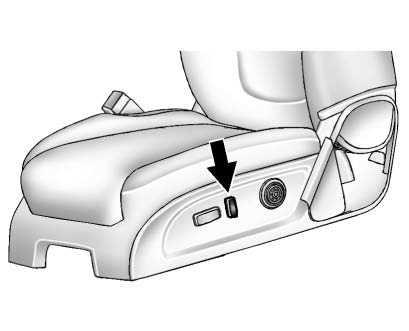
To adjust the seatback:
► Tilt the top of the control rearward to recline. ► Tilt the top of the control forward to raise.WARNING
Sitting in a reclined position when the vehicle is in motion can be dangerous.
Even when buckled up, the safety belts cannot do their job when reclined like this.
The shoulder belt cannot do its job because it will not be against your body. Instead, it will be in front of you. In a crash, you could go into it, receiving neck or other injuries.
The lap belt cannot do its job either. In a crash, the belt could go up over your abdomen.
The belt forces would be there, not at your pelvic bones.
This could cause serious internal injuries.
For proper protection when the vehicle is in motion, have the seatback upright. Then sit well back in the seat and wear the safety belt properly.
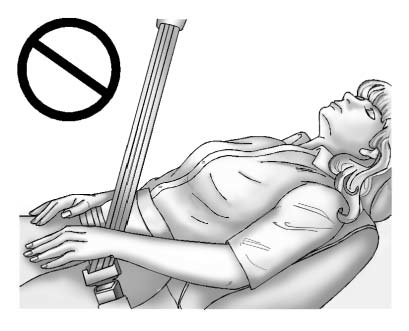
Do not have a seatback reclined if the vehicle is moving.
 Lumbar Adjustment
Manual Lumbar
If available, move the handle forward or rearward to increase or decrease lumbar
support.
Power Lumbar
If available, press and hold the front or rear of control to incre ...
 Memory Seats
On vehicles with the memory feature, the controls on the driver door are used
to program and recall memory settings for the driver seat, outside mirrors, and
power steering column, if available. ...
See also:
Fuel Gauge
Metric
English
When the ignition is on, the fuel gauge shows about how much fuel the vehicle
has left in the fuel tank.
An arrow on the fuel gauge indicates the side of the ve ...
Intelligent Cruise Control (ICC) system (if so equipped)
The Intelligent Cruise Control (ICC) system
automatically maintains a selected distance
from the vehicle traveling in front of
you according to that vehicle’s speed (up
to the set speed), or ...
Rear Display
Press the Rear Display(s) screen button to allow the choice of sources for rear
display between front disc, rear aux, or usb, if connected. ...


