



 Range Rover: Programing
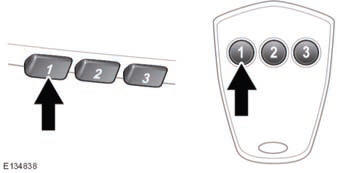
With the engine switched off;
1. Ensure that the ignition system is on.
2. Hold the end of the original garage door opener hand-held transmitter 2 to 6 inches (50 to 150 mm) away from the transceiver in the rear-view mirror, keeping the indicator lamp in view.
3. Using both hands, simultaneously press and hold both the chosen transceiver button on the rear-view mirror, as shown above, and the hand-held transmitter button. Keep both buttons pressed. The indicator lamp will flash slowly at first and then change to a fast flash. When the indicator lamp flashes rapidly, release both buttons. The rapid flashing lamp indicates successful programing.
4. If, after 60 seconds, the indicator lamp does not flash rapidly, release both the transceiver and the hand-held transmitter buttons and repeat the procedure starting with Step 2. Position the hand-held transmitter at a different angle and/or distance.
5. Press and hold the programed garage door opener button and observe the indicator lamp.
- • If the indicator is continuous, programing is complete and your device should operate when the garage door opener button is pressed and held for approximately 1 to 2 seconds and then released.
- • If the indicator lamp blinks rapidly for two seconds and then illuminates continuously, proceed with the following programing instructions for rolling code device equipment.
 Before programing
NOTICE
When programing a device that may require you to press and re-press the hand-held
transmitter (cycle), unplug the device during the cycling process to prevent possible
motor failure.
...
 To erase all programing
For first time programing, ensure that the engine is switched off:
1. Ensure that the ignition is on (but with the engine switched off).
2. Press and hold the two outer buttons on the transceiver in ...
See also:
TIREFIT kit version 2
► Pull connector 4 with the cable and
hose
5 out of the housing.
► Screw hose 5 onto flange 6 of tire
sealant bottle 1.
► Insert tire sealant bottle 1 head
downwards into re ...
Washer Fluid Messages
WASHER FLUID LOW ADD FLUID
This message displays when the windshield washer fluid is low.
Fill the windshield washer fluid reservoir as soon as possible.
See Engine Compartment Overview for t ...
Tire Rotation
Tires should be rotated every 12 000 km (7,500 mi).
See Maintenance Schedule .
Tires are rotated to achieve a uniform wear for all tires.
The first rotation is the most important.
Any time unusual ...


