



 Cadillac Escalade: License Plate Lamp
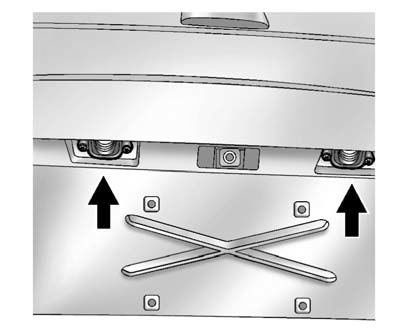
1. Remove the two screws holding each of the license plate lamps to the molding that is part of the liftgate.
2. Twist and pull the license plate lamp assembly forward through the molding opening.
3. Remove the bulb socket from the lamp assembly by turning it counterclockwise.
4. Pull the bulb straight out of the socket and install the new bulb.
5. Reverse Steps 1 through 3 to reinstall the license plate lamp.
 Back-Up Lamps
To replace this bulb:
1. Open the liftgate. See Liftgate for more information.
2. Remove the two screws from the taillamp assembly.
3. Pull the taillamp assembly rearward until the ...
 Replacement Bulbs
For replacement bulbs not listed here, contact your dealer. ...
See also:
Alpha-Numeric Keyboard
Letters of the alphabet, symbols, punctuation, and numbers, when available, displays
on the navigation screen as an alpha or numeric keyboard. The alpha keyboard displays
when the system requires en ...
Language — English/Metric
To change the language of the navigation screens or to change the navigation
screens from English or metric, see Driver Information Center (DIC)
for more information. ...
Playing a DVD
DVD video does not display on the navigation screen unless the vehicle is in
P (Park). It will operate on the rear seat entertainment screens while the vehicle
is moving. The Rear Seat Entertainment ...


