



 Mercedes-Benz GL-Class: Control panel for 3-zone automatic climate control
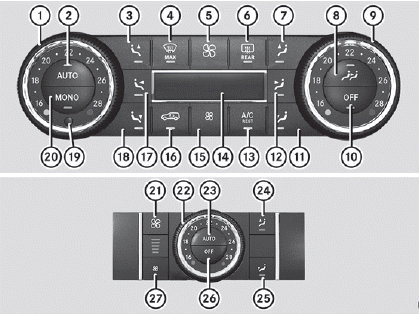
Canada only
Front control panel
1 To set the temperature, left
2 To set climate control to automatic
3 To direct the airflow through the defroster vents, left
4 To defrost the windshield
5 To increase the airflow
6 To switch the rear window defroster on/off
7 To direct the airflow through the defroster vents, right
8 To operate the rear-compartment climate control via the front control panel
9 To set the temperature, right
10 To switch climate control on/off
11 To direct the airflow to the footwells and side air vents, right
12 To direct the airflow through the center and side air vents, right
13 To activate/deactivate cooling with air dehumidification
To activate/deactivate the residual heat function
14 Display
15 To reduce the airflow
16 To activate/deactivate air-recirculation mode
17 To direct the airflow through the center and side air vents, left
18 To direct the airflow to the footwells and side air vents, left
19 Interior temperature sensor
20 To switch the MONO function on/off
Rear control panel
21 To increase the airflow
22 To set the temperature
23 To set the rear-compartment climate control to automatic
24 To direct the airflow through the rear air vents
25 To direct the airflow through the footwell vents()
26 To switch rear-compartment climate control on/off
27 To reduce the airflow
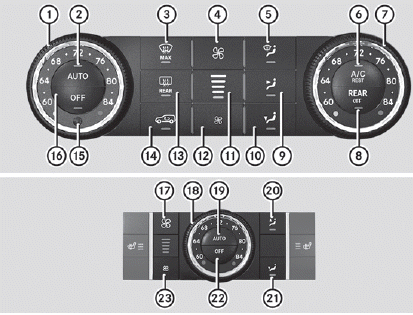
USA only
Front control panel
1 To set the temperature, left
2 To set climate control to automatic
3 To defrost the windshield
4 To increase the airflow
5 To direct the airflow through the defroster vents
6 To activate/deactivate cooling with air dehumidification
To activate/deactivate the residual heat function
7 To set the temperature, right
8 To switch rear-compartment climate control on/off
9 To direct the airflow through the center and side air vents
10 To direct the airflow to the footwells and side air vents
11 To display the airflow level
12 To reduce the airflow
13 To switch the rear window defroster on/off
14 To activate/deactivate air-recirculation mode
15 Interior temperature sensor
16 To switch climate control on/off
Rear control panel
17 To increase the airflow
18 To set the temperature
19 To set the rear-compartment climate control to automatic
20 To direct the airflow through the rear air vents
21 To direct the airflow through the footwell vents
22 To switch rear-compartment climate control on/off
23 To reduce the airflow
 Notes on using dual-zone automaticclimate control
The following contains notes and
recommendations on optimum use of dualzone
automatic climate control.
• Activate climate control using the
and
buttons. The indicator lamps in the
and
b ...
 Notes on using 3-zone automaticclimate control
The following contains instructions and
recommendations to enable you to get the
most out of your automatic climate control.
• Activate climate control using the
and
buttons. The indicator ...
See also:
Active Fuel Management®
Vehicles with V8 engines may have Active Fuel Management™. This system allows
the engine to operate on either all or half of its cylinders, depending on the driving
conditions. When less power is ...
Preview function (Intelligent Cruise Control system equipped models)
When the Preview Function identifies the
need to apply emergency braking by
sensing a vehicle ahead in the same lane
and the distance and relative speed from
it, it applies the brake pre-press ...
Portable Audio Devices
This vehicle has an auxiliary input, located on the audio faceplate, and a USB
port located on the instrument panel or in the center console. External devices
such as iPod®, laptop computers, MP3 p ...


