



 Infiniti QX: INFINITI Voice Recognition Alternate Command Mode
The following section is applicable when
Alternate Command Mode is activated.
When Alternate Command Mode is activated,
an expanded list of commands can
be used after pushing the TALK  switch.
In this mode, available commands are not
fully shown on the display or prompted.
Review the expanded command list when
this mode is active. See examples of
Alternate Command Mode screens.
Please note that in this mode the recognition
success rate may be affected as the
number of available commands and ways
of speaking each command are increased.
To improve the recognition success rate,
try using the Speaker Adaptation Function
available in that mode. (See “Speaker
adaptation function (for Alternate Command
Mode)” later in this section.) Otherwise
it is recommended that Alternate
Command Mode be turned OFF and Standard
Mode be used for the best recognition
performance.
switch.
In this mode, available commands are not
fully shown on the display or prompted.
Review the expanded command list when
this mode is active. See examples of
Alternate Command Mode screens.
Please note that in this mode the recognition
success rate may be affected as the
number of available commands and ways
of speaking each command are increased.
To improve the recognition success rate,
try using the Speaker Adaptation Function
available in that mode. (See “Speaker
adaptation function (for Alternate Command
Mode)” later in this section.) Otherwise
it is recommended that Alternate
Command Mode be turned OFF and Standard
Mode be used for the best recognition
performance.
Activating Alternate Command Mode
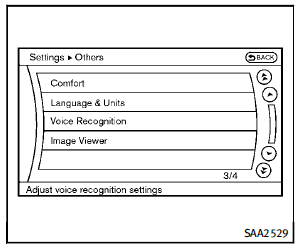
When the Standard Mode is active, perform the following steps to switch to the Alternate Command Mode. 1. Push the SETTING button on the instrument panel. 2. Highlight the “Others” key. 3. Highlight the “Voice Recognition” key.
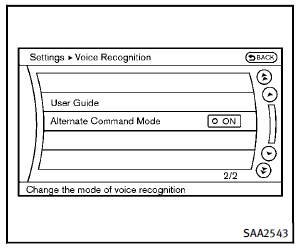
4. Highlight the “Alternate Command Mode” key. 5. The confirmation message is displayed on the screen. Push the “OK” key to activate the Alternate Command Mode.
Displaying command list
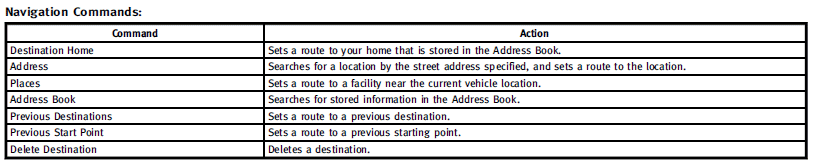
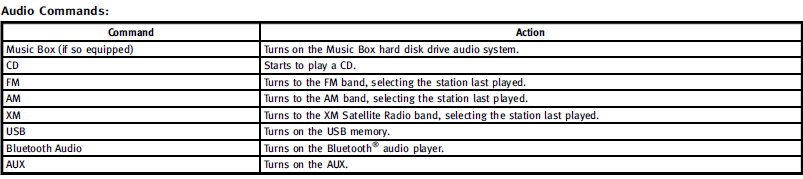
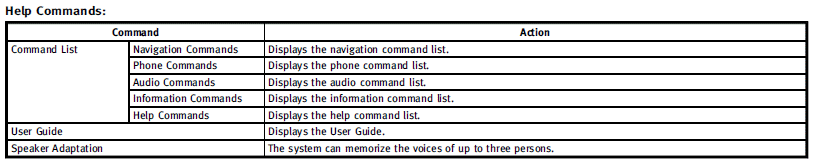
If you are controlling the system by voice commands for the first time or do not know the appropriate voice command, perform the following procedure for displaying the voice command list (available only in Alternate Command Mode).
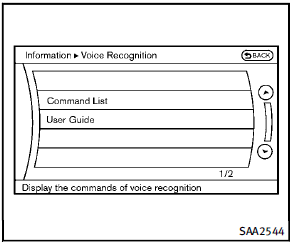
1. Push the INFO button on the instrument panel. 2. Select the “Others” key. 3. Select the “Voice Recognition” key. 4. Select the “Command List” key.
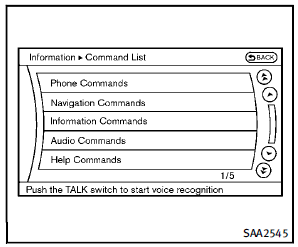
5. Select a category from the list.

6. Select an item. 7. If necessary, scroll the screen using the INFINITI controller to view the entire list. 8. Push the BACK button to return to the previous screen.
Command list



Displaying user guide
You can confirm how to use voice commands by accessing a simplified User Guide, which contains basic instructions and tutorials for several voice commands. 1. Push the INFO button on the instrument panel. 2. Select the “Others” key using the INFINITI controller and push the ENTER button. 3. Highlight the “Voice Recognition” key using the INFINITI controller and push the ENTER button. 4. Highlight the “User Guide” key using the INFINITI controller and push the ENTER button. 5. Highlight an item using the INFINITI controller and push the ENTER button.
Available items:
► Getting Started
Describe the basics of how to operate the INFINITI Voice Recognition system.
► Let’s Practice
Mode that allows practicing by following the instructions of the system voice.
► Using the Address Book
Refer to Navigation System Owner’s Manual.
► Finding a Street Address (if so equipped)
Refer to Navigation System Owner’s Manual.
► Placing Calls
Tutorial for making a phone call by voice command operation.
► Help on Speaking
Displays useful tips for how to correctly speak commands in order for them to be properly recognized by the system.
► Voice Recognition Settings
Describes the available voice recognition settings.
► Adapting the System to Your Voice
Tutorial adapting the system to your voice.
 Using the system
Initialization
When the ignition switch is pushed to the
ON position, INFINITI Voice Recognition is
initialized, which may take up to one
minute. When completed, the system is
ready to accept ...
 Using the system
Initialization
When the ignition switch is pushed to the
ON position, INFINITI Voice Recognition is
initialized, which may take up to one
minute. When completed, the system is
ready to accept ...
See also:
SRS warning lamps
SRS functions are checked regularly when
you switch on the ignition and when the
engine is running. Therefore, malfunctions
can be detected in good time.
The SRS warning lamp in the
instrumen ...
Top Tether Anchor
A top tether (A, C) anchors the top of the child restraint to the vehicle. A
top tether anchor is built into the vehicle. The top tether attachment (B) on the
child restraint connects to the top t ...
Engine compartment
CAUTION
Never use a fuse of a higher or lower
amperage rating than that specified on the
fuse box cover. This could damage the
electrical system or cause a fire.
If any electrical equipme ...


