



 Infiniti QX: Engine compartment
 CAUTION
Never use a fuse of a higher or lower
amperage rating than that specified on the
fuse box cover. This could damage the
electrical system or cause a fire.
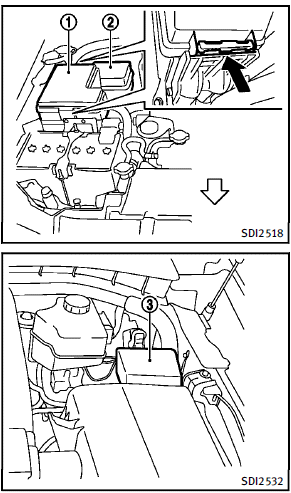
If any electrical equipment does not operate, check for an open fuse. 1. Be sure the ignition switch is pushed to the OFF or LOCK position and the headlight switch is turned to OFF. 2. Open the engine hood and remove the cover on the battery. 3. Remove the fuse/fusible link holder cover 1 , 2 or 3 . 4. Remove the fuse with the fuse puller.
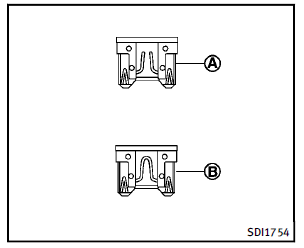
5. If the fuse is openA , replace it with a new fuseB . Spare fuses are stored in the passenger compartment fuse box. 6. If a new fuse also opens, have the electrical system checked and repaired by an INFINITI retailer.
Fusible links
If any electrical equipment does not operate and fuses are in good condition, check the fusible links. If any of these fusible links are melted, replace only with genuine INFINITI parts.
 Fuses
Fuses
Engine compartment ...
 Passenger compartment
CAUTION
Never use a fuse of a higher or lower
amperage rating than that specified on the
fuse box cover. This could damage the
electrical system or cause a fire.
If any electrical equipme ...
See also:
How to use touch screen
CAUTION
► The glass screen on the liquid crystal
display may break if it is hit with a hard
or sharp object. If the glass screen
breaks, do not touch it. Doing so could
result in an ...
Trailer Wiring Harness
Heavy-Duty Trailer Wiring Harness Package
The vehicle has a seven-pin universal heavy-duty trailer connector attached to
the rear bumper beam next to the integrated trailer hitch.
The seven-wire ...
Vehicle defects (Canada)
If you believe that your vehicle has a defect which could cause a crash or could
cause injury or death, you should immediately inform Transport Canada, in addition
to notifying Jaguar Land Rover C ...


