



 Buick Enclave: Hazard Warning Flashers
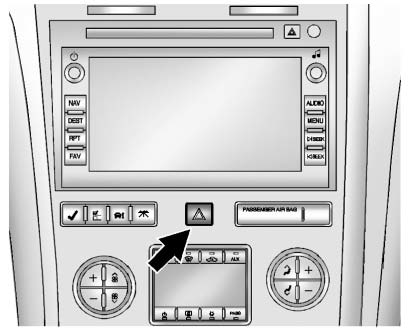
 Hazard Warning Flasher:
Press this button located on the instrument panel below the audio system, to make the front and rear turn signal lamps flash on and off.
This warns others that you are having trouble. Press again to turn the flashers off.
The turn signals do not work while the hazard warning flashers are on.
 Adaptive Forward Lighting (AFL)
Vehicles with the Adaptive Forward Lighting System (AFL) have headlamps that
swivel to the left or right when making a turn to provide better lighting. To enable
AFL, set the exterior lamp switch ...
 Turn and Lane-Change Signals
An arrow on the instrument panel cluster flashes in the direction of the turn
or lane change.
Move the lever all the way up or down to signal a turn.
Raise or lower the lever until the arrow sta ...
See also:
Specifications
Engine
This spark ignition system complies with the Canadian standard ICES-002.
Wheels and tires
Road wheel
...
Critical warning message (red)
Illuminates when a critical warning message is available in the message center. ...
Emergency
With Automatic Crash Response, the built-in system can automatically connect
to help in a crash even if you cannot ask for it.
Push to connect to an Emergency
Advisor. GPS technology is used to id ...


