



 Buick Enclave: Turn and Lane-Change Signals
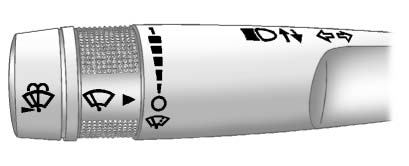
An arrow on the instrument panel cluster flashes in the direction of the turn or lane change.
Move the lever all the way up or down to signal a turn.
Raise or lower the lever until the arrow starts to flash to signal a lane change. Hold it there until the lane change is completed. If the lever is briefly pressed and released, the turn signal flashes three times.
The lever returns to its starting position whenever it is released.
If after signaling a turn or lane change the arrow flashes rapidly or does not come on, a signal bulb might be burned out.
Have the bulbs replaced. If the bulb is not burned out, check the fuse.
See Fuses and Circuit Breakers .
 Hazard Warning Flashers
Hazard Warning Flasher:
Press this button located on the instrument panel below the audio system, to
make the front and rear turn signal lamps flash on and off.
This warns others that you are h ...
 Turn Signal On Chime
If either one of the turn signals is left on and the vehicle has been driven
more than 1.2 km (0.75 mi), a chime will sound. ...
See also:
Checking the coolant level
NOTICE
Running the engine without coolant will cause serious engine damage.
The coolant level in the expansion tank should be checked at least weekly (more
frequently in high mileage or arduo ...
Brake (amber)
USA.
Canada.
Illuminates briefly as a bulb check when the ignition is switched on. If the
lamp illuminates after starting the engine or while driving, suspect worn brake
pads ...
Adding Equipment to the Airbag-Equipped Vehicle
Adding accessories that change the vehicle's frame, bumper system, height, front
end, or side sheet metal may keep the airbag system from working properly.
The operation of the airbag system ca ...


