



 Cadillac Escalade: Cruise Control
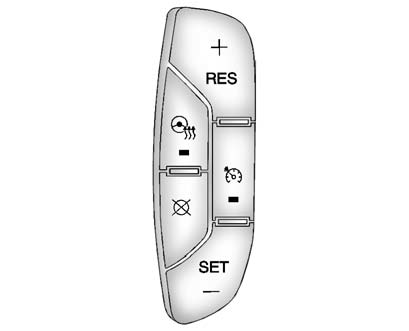
Cruise Control Shown with Heated Steering Wheel Button (If Equipped)
The cruise control buttons are located on the left side of the steering wheel.
 : Press to turn the system on or off.
The indicator light is on when cruise control is on and turns off when cruise control
is off.
: Press to turn the system on or off.
The indicator light is on when cruise control is on and turns off when cruise control
is off.
+ RES: Press briefly to make the vehicle resume to a previously set speed, or press and hold to accelerate.
SET −: Press to set the speed and activate cruise control or make the vehicle decelerate.
 : Press to disengage cruise control
without erasing the set speed from memory.
: Press to disengage cruise control
without erasing the set speed from memory.
See Cruise Control .
 Steering Wheel Controls
If available, some audio controls can be adjusted at the steering wheel.
: Press to go to the next favorite
radio station, track on a CD, or folder on an iPod® or USB device.
: Press to go to ...
 Navigation System
The navigation system provides detailed maps of most major freeways and roads
throughout the United States and Canada. After a destination has been set, the system
provides turn-by-turn instructions ...
See also:
Anti-lock Braking System (ABS)
WARNING
► The Anti-lock Braking System (ABS) is a
sophisticated device, but it cannot prevent
accidents resulting from careless or
dangerous driving techniques. It can
help maintain v ...
Air cleaner
To remove the filter, release the lock pins
1 and pull the unit upward 2 .
The filter element should not be cleaned
and reused. Replace it according to the
maintenance intervals. See “INFI ...
Remote Vehicle Start
This vehicle may have a remote starting feature that starts the engine from outside
of the vehicle.
(Remote Start): This button is located
on the RKE transmitter if the vehicle has remote start. ...


