



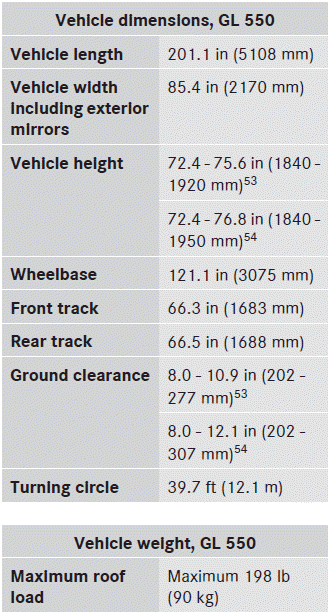
 Mercedes-Benz GL-Class: Vehicle data, GL 550
The data stated here refers specifically to a vehicle with standard equipment. Consult an authorized Mercedes-Benz Center for the data for all vehicle variants and trim levels.
 Vehicle data, GL 450
The data stated here refers specifically to a
vehicle with standard equipment. Consult an
authorized Mercedes-Benz Center for the
data for all vehicle variants and trim levels.
...

See also:
Vehicle defects (Canada)
If you believe that your vehicle has a defect which could cause a crash or could
cause injury or death, you should immediately inform Transport Canada, in addition
to notifying Jaguar Land Rover C ...
Rear Seat Entertainment (RSE) System (Headrest DVD)
Vehicles with an RSE system include two head restraint video display screens
with integrated DVD players, auxiliary inputs, two wireless headphones, and a remote
control. This system works independe ...
Roller sunblind, rear panorama roof
The rear panorama roof roller sunblind
protects the vehicle occupants in the third
row of seats from direct sunlight.
You can open/close the roller sunblind by
hand.
Always guide the roller ...


