



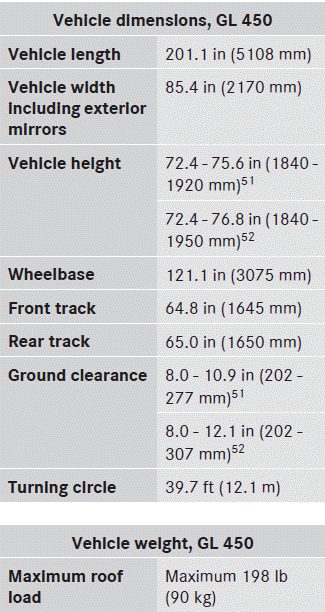
 Mercedes-Benz GL-Class: Vehicle data, GL 450
The data stated here refers specifically to a vehicle with standard equipment. Consult an authorized Mercedes-Benz Center for the data for all vehicle variants and trim levels.
 Vehicle data, GL 350 BlueTEC
The data stated here refers specifically to a
vehicle with standard equipment. Consult an
authorized Mercedes-Benz Center for the
data for all vehicle variants and trim levels.
...
 Vehicle data, GL 550
The data stated here refers specifically to a
vehicle with standard equipment. Consult an
authorized Mercedes-Benz Center for the
data for all vehicle variants and trim levels.
...
See also:
Navigation
OnStar navigation requires the Directions and Connections service plan.
Push to receive directions or have
them sent to the vehicle navigation screen. Destinations can also be forwarded to
the veh ...
Floor Console Storage
For vehicles with a second row center console, open each area to access the storage
compartment inside.
To access the upper storage area, press the upper button (B) and lift up. To
access the ...
Tire tread
WARNING
Although the applicable federal motor vehicle
safety laws consider a tire to be worn when
the tread wear indicators (TWI) become
visible at approximately 1/16 in (1.6 mm), we r ...


