



 Infiniti QX: Speedometer and odometer
Speedometer
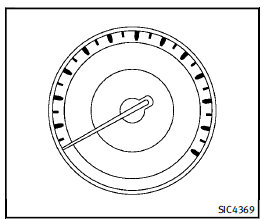
Speedometer
The speedometer indicates vehicle speed in miles per hour (MPH) and kilometers per hour (km/h).
Odometer/twin trip odometer
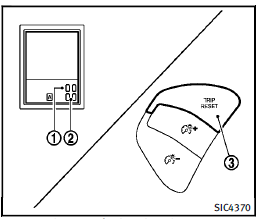
Odometer/twin trip odometer
The odometer 1 and twin trip odometer 2 are displayed on the dot matrix liquid crystal display when the ignition switch is in the ON position. The odometer records the total distance the vehicle has been driven. The twin trip odometer records the distance of individual trips. Changing the display: Pushing the TRIP RESET switch 3 at the bottom left of the combination meter panel changes the display as follows: TRIP A ? TRIP B ? TRIP A Resetting the trip odometer: Pushing the TRIP RESET switch3 for more than 1 second resets the trip odometer to zero. Average fuel economy and distance to empty information is also available. (See “Dot matrix liquid crystal display” later in this section.)
 Meters and gauges
1. Tachometer
2. Warning/Indicator lights
3. Speedometer
4. Engine coolant temperature gauge
5. Voltmeter
6. Dot matrix liquid crystal display/
Odometer/twin trip odometer
7. Engine oi ...
 Tachometer
The tachometer indicates engine speed in
revolutions per minute (RPM). Do not rev
the engine into the red zone 1 .
CAUTION
When engine speed approaches the red
zone, shift to a higher gea ...
See also:
Engine protection mode
The engine has an engine protection mode
to reduce the chance of damage if the
coolant temperature becomes too high (for
example, when climbing steep grades in
high temperature with heavy load ...
Special winter equipment
It is recommended that the following items
be carried in the vehicle during winter:
► A scraper and stiff-bristled brush to
remove ice and snow from the windows
and wiper blades.
υ ...
Adjusting the seats in the second andthird rows
Important safety notes
WARNING
Never travel in a moving vehicle with the seat
backrest in an excessively reclined position as
this can be dangerous. You could slide under
the seat bel ...


