



 Infiniti QX: Rear
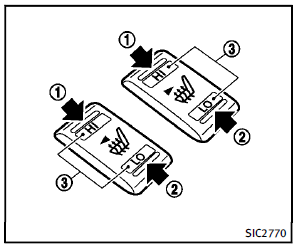
The 2nd row outboard seats are warmed by built-in heaters. The switches located on the back side of the center console can be operated independently of each other.
1. Start the engine.
2. Select heat range.
1 For high heat, push the HI (High)
side of the switch.
2 For low heat, push the LO (Low) side
of the switch.
The indicator light in the switch3 will
illuminate when the heater is on.
3. To turn off the heater, return the switch
to the level position. Make sure the
indicator light goes off.
The heater is controlled by a thermostat,
automatically turning the heater
on and off. The indicator light will
remain on as long as the switch is on.
When the vehicle’s interior is warmed,
or before you leave the vehicle, be sure
to turn off the switch.
 Front
Front
The front seats can be warmed by built-in
heaters. The switches located on the
instrument panel can be operated independently
of each other.
1. Start the engine.
2. Select heat range.
&# ...
 Climate controlled seats (if so equipped)
The climate controlled seat warms up or
cools down the front seats by blowing
warm or cool air from the surface of the
seat. The switches located on the instrument
panel can be operated inde ...
See also:
Voicetags
Voicetags enable the user to personalize the Voice system so that a single name
can be used to call-up a navigation destination, telephone number or radio channel.
To add a Voicetag:
1. Briefly pr ...
Rapid air pressure loss
Rapid air pressure loss or a “blow-out” can
occur if the tire is punctured or is damaged
due to hitting a curb or pothole. Rapid air
pressure loss can also be caused by
driving on under-in ...
If a Tire Goes Flat
It is unusual for a tire to blow out, especially if the tires are maintained
properly. See Tires .
If air goes out of a tire, it is much more likely to leak out slowly. But if
there is ever a blo ...


