



 Infiniti QX: Passenger compartment
 CAUTION
Never use a fuse of a higher or lower
amperage rating than that specified on the
fuse box cover. This could damage the
electrical system or cause a fire.
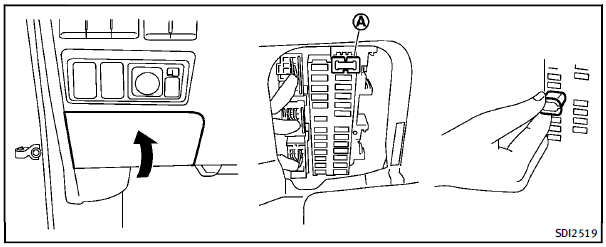
If any electrical equipment does not operate, check for an open fuse. 1. Be sure the ignition switch is pushed to the OFF or LOCK position and the headlight switch is turned to OFF. 2. Open the fuse box lid. 3. Remove the fuse with the fuse puller A . 4. If the fuse is open, replace it with a new fuse. 5. If a new fuse also opens, have the electrical system checked and repaired by an INFINITI retailer. Spare fuses are stored in the fuse box.
Extended storage switch (if so equipped)
To reduce battery drain, the extended storage switch comes from the factory switched off. Prior to delivery of your vehicle, the switch is pushed in (switched on) and should always remain on. If any electrical equipment does not operate, remove the extended storage switch and check for an open fuse.
NOTE:
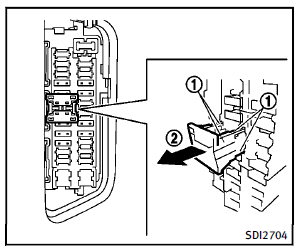
If the extended storage switch malfunctions or if the fuse is open, it is not necessary to replace the switch. In this case, remove the extended storage switch and replace it with a new fuse of the same rating. How to remove the extended storage switch:
1. To remove the extended storage switch, be sure the ignition switch is in the OFF or LOCK position. 2. Be sure the headlight switch is in the OFF position. 3. Remove the fuse box cover. 4. Pinch the locking tabs 1 found on each side of the storage switch. 5. Pull the storage switch straight out from the fuse box 2 .
 Engine compartment
CAUTION
Never use a fuse of a higher or lower
amperage rating than that specified on the
fuse box cover. This could damage the
electrical system or cause a fire.
If any electrical equipme ...
 Intelligent Key battery replacement
CAUTION
Be careful not to allow children to swallow
the battery and removed parts.
Replace the battery as follows:
1. Release the lock knob at the back of the
Intelligent Key and remove t ...
See also:
Washing by hand
Carefully remove all deposits of road salt as
soon as possible when driving in winter.
Also, clean the insides of the wheels when
washing the underbody of the vehicle.
► Do not use hot wat ...
Mirror dip when reversing
Selecting reverse gear will cause the door mirrors to automatically adjust, providing
an improved viewing angle for reversing.
The exact dipped position can be adjusted when the mirrors are dipped. ...
Anti-theft Alarm System
Your vehicle has a content theft-deterrent alarm system.
This is the security light.
To arm the theft-deterrent system:
1. Open the door.
2. Lock the door with the Remote Keyless Entry (RKE) tra ...


