



 Mercedes-Benz GL-Class: Overview of interior lighting
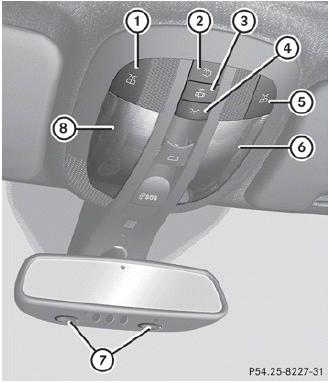
Overhead control panel
1  Switches the left-hand front
reading
lamp on/off
Switches the left-hand front
reading
lamp on/off
2  Switches the rear interior
lighting
on/off
Switches the rear interior
lighting
on/off
3  Switches the automatic interior
lighting control on/off
Switches the automatic interior
lighting control on/off
4  Switches the front interior
lighting
on/off
Switches the front interior
lighting
on/off
5 Switches the right-hand front
reading lamp on/off
6 Front interior lighting
7 Front reading lamps
8 Front interior lighting
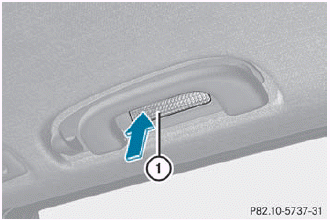
Rear overhead control panel (second row of seats) 1 Switches the reading lamp on/off
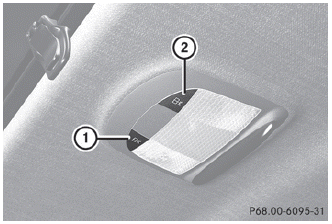
Rear overhead control panel (third row of seats)
1 Switches the left-hand reading
lamp
on/off
2 Switches the right-hand reading
lamp on/off

 Interior lighting control
Important notes
In order to prevent the vehicle's battery from
discharging, the interior lighting functions are
automatically deactivated after some time
except for when the SmartKey is in positio ...
See also:
Adding Destinations to the Address Book
There are two ways to add a destination to the address book:
To add the current vehicle position to the address book, press the Mark
screen button from the map screen. The system automatically s ...
Third Row Seats
The third row seatbacks can be folded forward, and the seats can be removed.
To fold the third row seatback:
1. Remove anything on or under the seat.
2. Disconnect the rear safety belt mini-latch ...
Driving with summer tires
At temperatures below 45 °F (+7 °C), the
elasticity of summer tires and therefore also
traction and braking capability are reduced
considerably — equip your vehicle with
M+S tires. Using summe ...


