



 Mercedes-Benz GL-Class: Important safety notes
WARNING 
When leaving the vehicle, always remove the
SmartKey from the ignition lock. Always take
the SmartKey with you and lock the vehicle.
Do not leave children unattended in the
vehicle, even if they are secured in a child
restraint system, or with access to an
unlocked vehicle. A child's unsupervised
access to a vehicle could result in an accident
and/or serious personal injury. The children
could:
• injure themselves on parts of the
vehicle
• be seriously or fatally injured
through
excessive exposure to extreme heat or cold
• injure themselves or cause an
accident with
vehicle equipment that can be operated
even if the SmartKey is removed from the
ignition lock or removed from the vehicle,
such as seat adjustment, steering wheel
adjustment, or the memory function
If children open a door, they could injure other
persons or get out of the vehicle and injure
themselves or be injured by following traffic.
Do not expose the child restraint system to
direct sunlight. The child restraint system's
metal parts, for example, could become very
hot, and the child could be burned on these
parts.
WARNING
Children could open a rear door from inside
the vehicle. This could result in serious
injuries or an accident. Therefore, when
children ride in the rear always secure the rear
doors with the child-proof locks.
You secure each door individually with the child-proof locks on the rear doors. A door secured with a child-proof lock cannot be opened from inside the vehicle. When the vehicle is unlocked, the door can be opened from the outside.
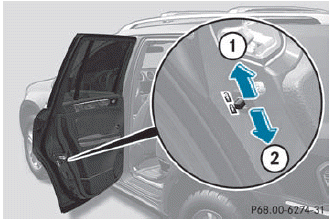
► To activate: press the child-proof lock
lever down in the direction of arrow 2.
► Make sure that the child-proof locks are
working properly.
► To deactivate: press the child-proof lock
lever up in the direction of arrow 1.

 Override feature for the rear sidewindows
WARNING
When children ride on the vehicle's rear seats,
activate the override switch. Otherwise, the
children could be injured, e.g. by trapping
themselves in the rear side window.
...
See also:
How to Check Lubricant
To get an accurate reading, the vehicle should be on a level surface.
A. Drain Plug
B. Fill Plug
If the level is below the bottom of the fill plug hole, located on the transfer
case, some lubric ...
Collision Parts
Genuine GM Collision parts are new parts made with the same materials and construction
methods as the parts with which the vehicle was originally built. Genuine GM Collision
parts are the best choic ...
Towing a vehicle with both axles onthe ground
When having your vehicle towed, observe the
important safety notes.
WARNING
The power assistance for the steering and the
brake force booster do not work when the
engine is not runnin ...


