



 Buick Enclave: Heated and Ventilated Seats
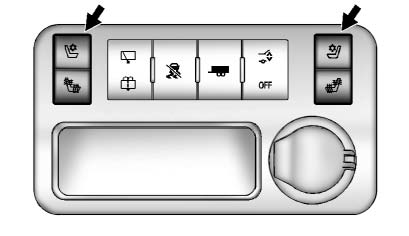
Heated and Cooled Seat Buttons Shown, Heated Seat Buttons Similar
If available, the buttons are on the center console. To operate, the engine must be running.
 : If available, press to heat the
seatback only.
: If available, press to heat the
seatback only.
 : If available, press to cool the
entire seat.
: If available, press to cool the
entire seat.
 : Press to heat the seat and seatback.
Press the button once for the highest setting. With each press of the button, the seat will change to the next lower setting, and then to the off setting. The lights indicate three for the highest setting and one for the lowest.
See Heated and Ventilated Front Seats for more information.
 Third Row Seats
The third row seatbacks can be folded forward, and the seats can be removed.
To fold the third row seatback:
1. Remove anything on or under the seat.
2. Disconnect the rear safety belt mini-latch ...
 Head Restraint Adjustment
Do not drive until the head restraints for all occupants are installed and adjusted
properly.
To achieve a comfortable seating position, change the seatback recline angle
as little as necessary w ...
See also:
Maintenance Replacement Parts
Replacement parts identified below by name, part number, or specification can
be obtained from your dealer
...
Installing child restraint LATCH
lower anchor attachments
LATCH webbing-mounted attachment
LATCH compatible child restraints include
two rigid or webbing-mounted attachments
that can be connected to anchors located
at certain seating positions in ...
Compass
Calling up the compass
► Press the
button on the
multifunction steering wheel repeatedly
until the Offroad menu appears in the
multifunction display.
The compass shows which direction t ...


