



 Cadillac Escalade: Hazard Warning Flashers
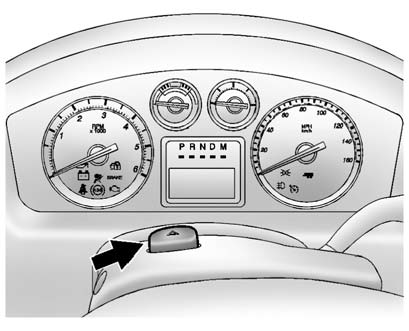
 (Hazard Warning Flashers):
Press this button located on top of the steering column, to make the front and rear turn signal lamps flash on and off. This warns others that you are having trouble. Press again to turn the flashers off.
When the hazard warning flashers are on, the vehicle's turn signals will not work.
 Automatic Headlamp System
When it is dark enough outside, the automatic headlamp system turns on the headlamps
at the normal brightness, along with the taillamps, sidemarker, parking lamps, and
the instrument panel lights. T ...
 Turn and Lane-Change Signals
An arrow on the instrument panel cluster flashes in the direction of the turn
or lane change.
Move the turn signal lever all the way up or down to signal a turn.
Raise or lower the lever until th ...
See also:
Switching DSC ON
DSC is re-enabled by one of the following:
• Press and briefly hold the DSC OFF switch.
• Start the engine.
• Select a new Terrain response special program.
...
All-Wheel-Drive Vehicles
Dinghy and Dolly Towing
Notice: Towing an all-wheel-drive vehicle with all four wheels on the ground,
or even with only two of its wheels on the ground, will damage drivetrain components.
Do no ...
Points of interest (POI)
After selecting Points of interest from the menu, touch Name to input the POI
name, for example, Gasoline to display fuel stations on the map, or touch List for
a list of POIs. Alternatively, choo ...


