



 Cadillac Escalade: Automatic Headlamp System
When it is dark enough outside, the automatic headlamp system turns on the headlamps at the normal brightness, along with the taillamps, sidemarker, parking lamps, and the instrument panel lights. The radio lights will also be dim.
To turn off the automatic headlamp system, turn the exterior lamps switch to the off position and then release it.
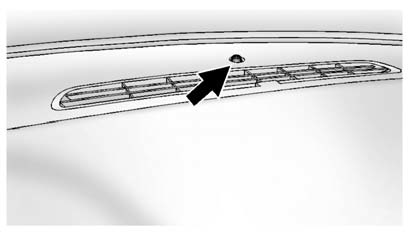
The vehicle has a light sensor located on the top of the instrument panel which regulates when the automatic headlamps turn on. Do not cover the sensor, otherwise the headlamps will come on whenever the ignition is on.
The system may also turn on the headlamps when driving through a parking garage, heavy overcast weather, or a tunnel. This is normal.
There is a delay in the transition between the daytime and nighttime operation of the automatic headlamp system so that driving under bridges or bright overhead street lights does not affect the system. The automatic headlamp system is only affected when the light sensor detects a change in lighting lasting longer than the delay.
If the vehicle is started in a dark garage, the automatic headlamp system will come on immediately. Once the vehicle leaves the garage, it takes approximately one minute for the automatic headlamp system to change if it is bright enough outside. During that delay, the instrument panel cluster may not be as bright as usual. Make sure the instrument panel brightness control is in the full bright position. See Instrument Panel Illumination Control .
To idle the vehicle with the automatic headlamp system off, turn the control to the off position.
The headlamps will also stay on after you exit the vehicle. This feature can be programmed using the Driver Information Center (DIC). See Vehicle Personalization .
The regular headlamp system can be turned on when needed.
 Daytime Running Lamps (DRL)
Daytime Running Lamps (DRL) can make it easier for others to see the front of
your vehicle during the day. Fully functional daytime running lamps are required
on all vehicles first sold in Canada.
...
 Hazard Warning Flashers
(Hazard Warning Flashers):
Press this button located on top of the steering column, to make the front and
rear turn signal lamps flash on and off. This warns others that you are having trouble.
...
See also:
Preview function (Intelligent Cruise Control system equipped models)
When the Preview Function identifies the
need to apply emergency braking by
sensing a vehicle ahead in the same lane
and the distance and relative speed from
it, it applies the brake pre-press ...
When Should an Airbag Inflate?
Frontal airbags are designed to inflate in moderate to severe frontal or near-frontal
crashes to help reduce the potential for severe injuries mainly to the driver's
or right front passenger' ...
Points of interest (POI)
After selecting Points of interest from the menu, touch Name to input the POI
name, for example, Gasoline to display fuel stations on the map, or touch List for
a list of POIs. Alternatively, choo ...


