



 Infiniti QX: Hazard warning flasher switch
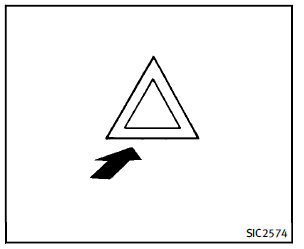
Push the switch on to warn other drivers when you must stop or park under emergency conditions. All turn signal lights will flash.
 WARNING
► If stopping for an emergency, be sure to
move the vehicle well off the road.
► Do not use the hazard warning flashers
while moving on the highway unless
unusual circumstances force you to drive
so slowly that your vehicle might become
a hazard to other traffic.
► Turn signals do not work when the
hazard warning flasher lights are on.
The flasher can be actuated with the ignition switch in any position. When an impact that could activate the supplemental air bags is detected, the hazard warning flasher lights blink automatically. If the hazard warning flasher switch is pushed twice, the hazard warning flashers will turn off.
WARNING
Do not turn the hazard warning flasher
switch to off until you can make sure that it
is safe to do so. Also, the hazard flasher
warning may not blink automatically depending
on the force of impact.
Some state laws may prohibit the use of the hazard warning flasher switch while driving.
 Fog light switch
To turn the fog lights on, turn the headlight
switch to the position, then turn
the
switch to the position. To turn them
off, turn the switch to the OFF position.
The headlights must be o ...
 Heated steering wheel
The heated steering wheel system is
designed to operate only when the surface
temperature of the steering wheel is below
688F (208C).
Push the heated steering wheel switch to
warm the stee ...
See also:
Storing Memory Positions
To save into memory:
1. Adjust the driver seat, including the seatback recliner and lumbar, both outside
mirrors, power steering column, and the throttle and brake pedals.
See Power Mirrors , ...
Power Steering Fluid
See Engine Compartment Overview for reservoir location. ...
Door Locks
WARNING
Unlocked doors can be dangerous.
► Passengers, especially children, can easily open the doors and fall out of a moving
vehicle. When a door is locked, the handle will not open it. Th ...


