



 Mercedes-Benz GL-Class: Folding the rear bench seat forwards
 If the driver's or front-passenger seat is
set for a larger person, it may not be
possible to fold the rear bench seat
forwards. In this case, move the front seats
as far forward as possible.
If the driver's or front-passenger seat is
set for a larger person, it may not be
possible to fold the rear bench seat
forwards. In this case, move the front seats
as far forward as possible.
► Move the head restraints to the lowest
position.
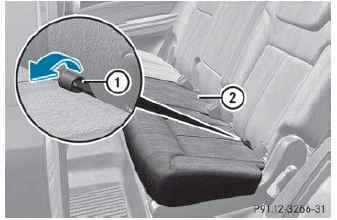
► Pull release loop 1 of seat cushion 2.
► Fold seat cushion 2 upwards.
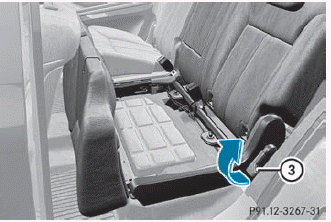
► Pull release catch 3 in the direction of the arrow.
The backrest is released.
 The backrest is heavy. Therefore, take
care when folding it down. Make sure that
the head restraints are pushed all the way
in so that the backrests and seat cushions
are not damaged.
The backrest is heavy. Therefore, take
care when folding it down. Make sure that
the head restraints are pushed all the way
in so that the backrests and seat cushions
are not damaged.
► Fold the backrest forwards until it engages in the cargo compartment position.
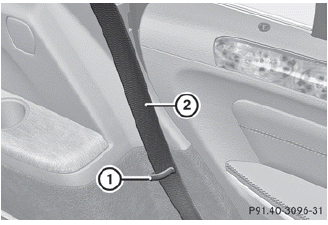
► Guide seat belts 2 under respective clips 1.
 Enlarging the cargo compartment
Important safety notes
WARNING
When expanding the cargo volume, always
fully fold the corresponding seats and, if so equipped, always use the cargo net
when
transporting cargo.
Unle ...
 Folding the rear bench seat back
► Pull release catch 3 upwards.
► Fold backrest 2 backwards until it
engages, making sure not to trap the seat
belts while doing so.
► Fold seat cushion 1 backwards and push
u ...
See also:
Operating audio player or audio media
Audio data from various audio devices or
media can be played, depending on the
equipment installed in the vehicle.
► Switch on COMAND and select the audio
device or medium (see the separat ...
Tire pressure monitoring system (yellow)
Illuminates when one or more tires are significantly under-inflated. Stop the
vehicle as soon as possible, check the tire pressures and inflate to the recommended
pressure. ...
Activating/deactivating the distancewarning function
This function is only available with
DISTRONIC.
► Press
on the steering wheel
to select the Additional functions menu.
► Press the
button to select the
Distance warning function ...


