



 Buick Enclave: Floor Console Storage
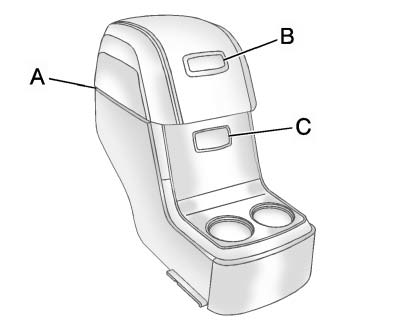
For vehicles with a second row center console, open each area to access the storage compartment inside.
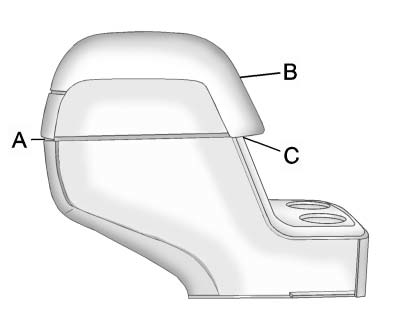
To access the upper storage area, press the upper button (B) and lift up. To access the lower storage area, press the lower button (C) and lift up. The top of the console can be folded forward for increased storage area. Lift up on the handle on the rear of the console (A) and pull forward.
 WARNING
Never open more than one of the three latches at a time to help avoid personal
injury and damage to the console.
Notice: Slide the front console as far forward as it will go before folding the second row console forward to help prevent damage to the consoles.
 Armrest Storage
Vehicles with a rear seat armrest have two cupholders. Pull the armrest down
to access the cupholders.
Center Console Storage
Pull up on the lever, located on the front of the center console a ...

See also:
Windows
Premium Trim Shown, Up-Level Similar
The driver door has switches that control all windows, the passengers door switch
only control that window. The power windows work when the ignition is in ON/R ...
Snow chains
For safety reasons, Mercedes-Benz
recommends that you only use snow chains
which have been specially approved for your
vehicle by Mercedes-Benz, or are of a
corresponding standard of quality.
...
Power steering fluid
Check the fluid level in the reservoir.
The fluid level should be checked using the
HOT range (1 : HOT MAX., 2 : HOT MIN.).
at fluid temperatures of 122 to 1768F (50
to 808C) or using the CO ...


