



 Mercedes-Benz GL-Class: Cleaning the rear view camera
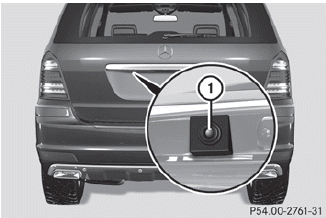
► Use clear water and a soft cloth to clean camera lens 1.
 Do not clean the camera lens and the area
around the rear view camera with a power
washer.
Do not clean the camera lens and the area
around the rear view camera with a power
washer.
 Cleaning the sensors
► Clean sensors 1 of the driving systems
with water, car shampoo and a soft cloth.
When cleaning the sensors with a power
washer, maintain a distance between the
vehicle and the nozzle ...
 Cleaning the exhaust tail pipes
Impurities combined with the effects of road
grit and corrosive environmental factors may
cause flash rust to form on the surface. You
can restore the original shine of the exhaust
tail pipe by cl ...
See also:
Passenger Sensing System
United States
Canada and Mexico
The passenger sensing system will turn off the right front passenger frontal
airbag under certain conditions. The driver airbag, seat-mounted side impact airbag ...
NECK-PRO luxury head restraints
If you have difficulty resetting the NECKPRO
luxury head restraints, have this work
carried out at a qualified specialist
workshop, e.g. an authorized Mercedes-
Benz Center.
► Remove res ...
Speed-dependent mode
If vehicle speed drops below 5 mph (8 km/h) with the wipers operating, the wipers
will switch to the next lowest speed. When vehicle speed increases to over 5 mph
(8 km/h), the original wiper spee ...


