



 Cadillac Escalade: Back-Up Lamps
To replace this bulb:
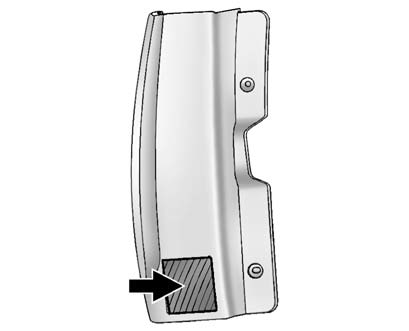
1. Open the liftgate. See Liftgate for more information.
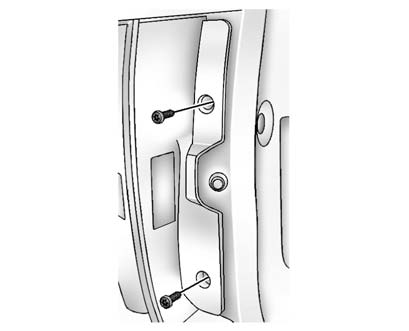
2. Remove the two screws from the taillamp assembly.
3. Pull the taillamp assembly rearward until the inner pins on the taillamp assembly disengage from the vehicle.
4. Press the release tab, if the bulb socket has one, and turn the socket counterclockwise to remove it from the taillamp assembly.
5. Pull the old bulb straight out from the socket.
6. Press a new bulb into the socket, insert the socket into the taillamp assembly and turn the socket clockwise into the taillamp assembly until it clicks.
7. Reinstall the taillamp assembly. When reinstalling, make sure to line up the pins on the taillamp assembly with the vehicle. If the pins do not line up correctly, the taillamp assembly will not be able to be installed properly.
If the taillamp, stoplamp, or turn signal need to be replaced, see your dealer for service.
 LED Lighting
The vehicle may have LED headlamps. For replacement of the LED lighting assembly
contact your dealer. ...
 License Plate Lamp
1. Remove the two screws holding each of the license plate lamps to the molding
that is part of the liftgate.
2. Twist and pull the license plate lamp assembly forward through the molding
opening ...
See also:
Reporting Safety Defects to the United States Government
If you believe that your vehicle has a defect which could cause a crash or could
cause injury or death, you should immediately inform the National Highway Traffic
Safety Administration (NHTSA) in ...
Automatic transmission fluid
Contact an INFINITI retailer if replacement
is required.
CAUTION
► Use only Genuine NISSAN Matic S ATF.
Do not mix with other fluids.
► Using automatic transmission fluid other ...


