



 Mercedes-Benz GL-Class: Adjusting the angle of the head restraints
WARNING 
Vehicles with Rear Seat Entertainment
System: When adjusting the head restraint,
make sure your fingers do not become caught between the head restraint cushion
and the monitor. Failing to do so may lead to injury.
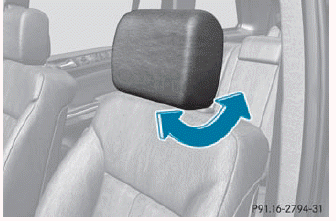
► Push or pull the lower edge of the head restraint in the direction of the arrow.
 Adjusting the head restraints manually
The head restraints must only be removed
at a qualified specialist workshop.
Mercedes-Benz recommends that you use
a Mercedes-Benz Center for this purpose.
► If the head restraint is f ...
 Adjusting the head restraint heightelectrically
► To adjust the head restraint height:
slide
the switch for head restraint adjustment up or down in the direction of
the arrow. ...
See also:
Power Assist Steps
The vehicle may have power assist steps. To enable or disable the power assist
steps push .
The power assist steps automatically extend from beneath the vehicle on the side
in which the door has ...
Remote Keyless Entry (RKE) System Operation
The Remote Keyless Entry (RKE) transmitter functions work up to 60m(195 ft) away
from the vehicle.
There are other conditions which can affect the performance of the transmitter.
See Remote Keyless ...
Pairing and connecting a bluetooth® device using the touch screen
For further information on Bluetooth®, see 137, BLUETOOTH® INFORMATION.
1. Switch on your device’s Bluetooth® connection. Make sure that it is in Bluetooth®
discoverable mode, sometimes refer ...


