



 Infiniti QX: 4WD shift indicator
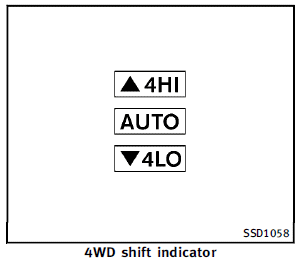
The 4WD shift indicator is displayed in the
vehicle information display.
The indicator should turn off within 1
second after placing the ignition switch in
the ON position.
While the engine is running, the 4WD shift
indicator will illuminate the position selected
by the 4WD shift switch. (See the
4WD shift procedure list shown in the
“INFINITI all-mode 4WD® system” earlier in
this section.).
► The 4WD shift indicator may blink while
shifting from one drive mode to the
other. When the shifting is completed,
the 4WD shift indicator will come on. If
the indicator does not come on immediately,
make sure the area around
the vehicle is safe, and drive the
vehicle straight, accelerate or decelerate
or move the vehicle in reverse,
then shift the 4WD shift switch.
► If the 4WD warning light comes on, the
4WD shift indicator turns off.
 4WD shift switch
► Shift the 4WD shift switch to either the
AUTO, 4H or 4L position, depending on
driving conditions.
► With the switch set to the AUTO position,
distribution of torque to the front ...
 4WD warning light
The 4WD warning light is located in the
meter.
The 4WD warning light comes on when the
ignition switch is placed in the ON position.
It turns off soon after the engine is
started.
If any ...
See also:
Road testing dynamometers (rolling roads)
It is essential that any dynamometer testing is carried out only by a qualified
person, familiar with the dynamometer testing and safety procedures practiced by
Land Rover Retailer/ Authorized Rep ...
Airbag Readiness Light
This light shows if there is an electrical problem. The system check includes
the airbag sensor(s), passenger sensing system, the pretensioners, the airbag modules,
the wiring, and the crash sensi ...
Map Scales
+ / − (Zoom In/Zoom Out): Press the zoom in or out screen buttons or the scale
on the bar to change the level of map detail. The scale appears on the screen once
the zoom in or zoom out screen ...


