



 Mercedes-Benz GL-Class: Tail lamps with LEDs
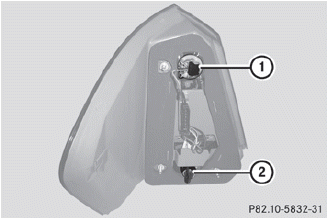
1 Rear fog lamp
2 Backup lamp
► Switch off the lights.
► Open the cargo compartment.
► Open the side trim panel.
► Turn the corresponding bulb holder
counter-clockwise and remove it.
► Remove the bulb from the bulb holder.
► Insert the new bulb into the bulb
holder.
► Insert the bulb holder and turn it
clockwise.
► Close the side trim panel.
 Opening and closing the side trimpanels
You must open the side trim panel in the
cargo compartment before you can change
the bulbs in the tail lamps.
Left-hand side trim panel
► To open: turn release knob 1 90° in the
directio ...
 License plate lamps
► Switch off the lights.
► Open the tailgate.
► Remove screws 1.
► Remove the license plate lamp.
► Replace the bulb.
► Insert the license plate lamp.
υ ...
See also:
Parking lamp/standing lamp
► Switch off the lights.
► Open the hood.
► Turn bulb holder 1 counter-clockwise and
pull it out.
► Take the bulb out of bulb holder 1.
► Insert the new bulb into ...
Remote key fob transmitter locations
1. Cabin front transmitter.
2. Keyless start module.
3. Front exterior door handle transmitters.
4. Rear exterior door handle transmitters.
5. Cabin headlining transmitter.
6. Loadspace interio ...
Turning the System On and Off
Press this button, located next to the radio, to disable URPA.
The indicator light will come on and PARK ASSIST OFF displays on the Driver Information
Center (DIC). See Object Detection System Mes ...


