



 Mercedes-Benz GL-Class: License plate lamps
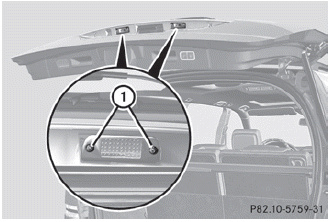
► Switch off the lights.
► Open the tailgate.
► Remove screws 1.
► Remove the license plate lamp.
► Replace the bulb.
► Insert the license plate lamp.
► Replace and tighten screws 1.
 Tail lamps with LEDs
1 Rear fog lamp
2 Backup lamp
► Switch off the lights.
► Open the cargo compartment.
► Open the side trim panel.
► Turn the corresponding bulb holder
counter-clockwise ...
 Adjusting the headlamps
1 V vertical axis
2 H (horizontal) height, measured from the
center
Setting the headlamps correctly is extremely
important. Setting the high-beam headlamps
also sets the low-beam headlamps. (Th ...
See also:
Battery warning symbols
Do not allow naked flames
or other sources of ignition near the battery, as the battery may emit explosive
gases.
Ensure that when working
near or handling the battery, suitable eye pro ...
Remote Keyless Entry (RKE) System
The RKE transmitter is used to remotely lock and unlock the doors from up to
60m (195 ft) away from the vehicle.
Press to unlock the driver door.
Press again within three seconds
to unlock all ...
Storage Compartments
For vehicles with a second row center console, press the buttons (B) or (C) to
access storage areas.
Lift up on (A) for additional storage area.
See Floor Console Storage . ...


