



 Mercedes-Benz GL-Class: Opening and closing the side trimpanels
You must open the side trim panel in the cargo compartment before you can change the bulbs in the tail lamps.
Left-hand side trim panel
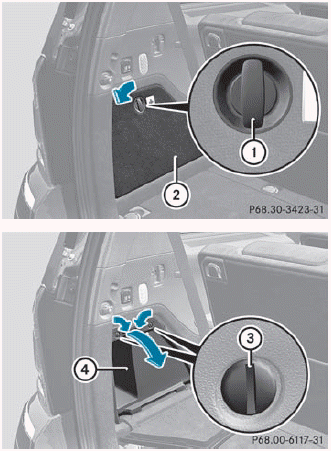
► To open: turn release knob 1 90° in the
direction of the arrow and remove side trim
panel 2.
► Insert a suitable object, e.g. a coin,
into the
slots of release knobs 3.
► Turn release knobs 3 90° in the direction
of the arrow and remove stowage
compartment 4.
► To close: insert stowage
compartment 4 and turn release
knobs 3 in the opposite direction to the
arrow until the slots on the release knobs
are in a vertical position.
► Insert side trim panel 2 and turn release knob 1 90° in the opposite direction to the arrow.
Right-hand side trim panel
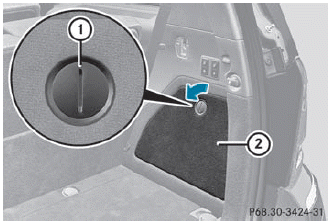
► To open: insert a suitable object, e.g.
a
coin, into the slot of release knob 1 on
side trim panel 2.
► Turn release knob 1
90° in the direction
of the arrow and remove side trim
panel 2.
► To close: insert side trim panel ; and
turn
release knob 1 90° in the opposite
direction to the arrow.

 Tail lamps with LEDs
1 Rear fog lamp
2 Backup lamp
► Switch off the lights.
► Open the cargo compartment.
► Open the side trim panel.
► Turn the corresponding bulb holder
counter-clockwise ...
See also:
Automatic Dimming Mirror
If the vehicle has the automatic dimming mirror, the driver outside mirror automatically
adjusts for the glare of headlamps behind you.
This feature is controlled by the on and off setting on the i ...
Trip computer "From start" or "Fromreset"
The values in the From Start submenu refer
to the start of your journey, while those in the
From Reset submenu refer to the last time
you reset this submenu.
► Press the
button on the
s ...
Overview
A. (Power/Volume)
B. (Eject)
C. Mark Touch Screen Button
D. (Zoom In) Touch Screen Button
E. Map Scale
F. North Up/Heading Up Symbol
G. No GPS Symbol
H. Full map Touch Screen Button
I. So ...


