



 Mercedes-Benz GL-Class: Switching on/off
The three red indicator lamps in the button indicate the heating level you have selected.
 If the battery voltage is too low, the seat
heating may switch off.
If the battery voltage is too low, the seat
heating may switch off.
One or more of the indicator lamps in the seat heating button are flashing.
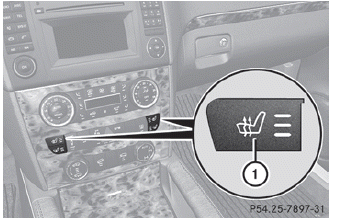
Driver's and front-passenger seat
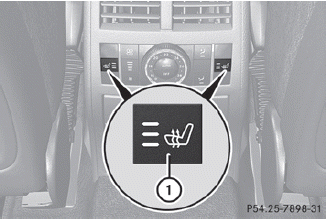
Rear seats
The system automatically switches down from level 3 to level 2 after approximately five minutes.
The system automatically switches down from level 2 to level 1 after approximately ten minutes.
The system automatically switches off approximately 20 minutes after it is set to level 1.
► Make sure that the SmartKey is in
position
2 in the ignition lock.
► To switch on: press button 1 repeatedly
until the desired heating level is set.
► To switch off: press button 1 repeatedly
until all the indicator lamps go out.

 Problems with the seat heating
If one or all of the indicator lamps in the seat
heating button are flashing, the seat heating
has switched off automatically. The vehicle's
electrical system voltage is too low because
too many e ...
See also:
Vehicle Security
This vehicle has theft-deterrent features; however, they do not make it impossible
to steal. ...
Used engine oil
Prolonged contact with engine oil may cause serious skin disorders, including
dermatitis and cancer of the skin. Always wash thoroughly after contact.
It is illegal to pollute drains, water cours ...
Safety Belt Care
Keep belts clean and dry.
WARNING
Do not bleach or dye safety belts.
It may severely weaken them.
In a crash, they might not be able to provide adequate protection.
Clean safety belts only with m ...


