



 Cadillac Escalade: RVC Location
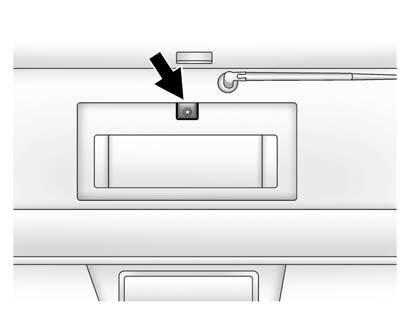
The camera is located above the license plate.
This shows the field of view that the camera provides.
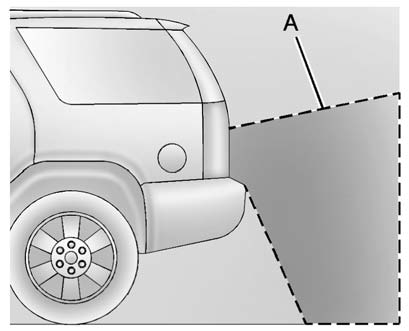
A. View displayed by the camera
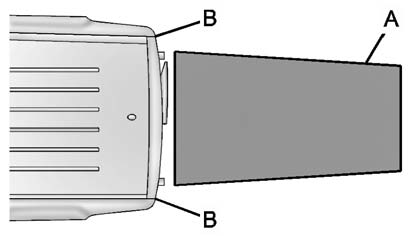
A. View displayed by the camera
B. Corners of the rear bumper
Displayed images may be further or closer than they appear. The area displayed is limited and objects which are close to either corner of the bumper or under the bumper do not display.
 Guidelines
The RVC system has a guideline overlay that can help the driver align the vehicle
when backing into a parking spot.
To turn the guidelines on or off:
1. Make sure that URPA has not been disabled.
...
 When the System Does Not Seem To Work Properly
The RVC system might not work properly or display a clear image if:
The RVC is turned off. See “Turning the RVC System On or Off” earlier
in this section.
It is dark.
The sun or the beam ...
See also:
Phone
Bluetooth
For vehicles equipped with Bluetooth capability, the system can interact with
many cell phones, allowing:
Placement and receipt of calls in a hands-free mode.
Sharing of the cell pho ...
Wipers and washers
Feature 1. can be enabled
or disabled by your Land Rover Retailer/Authorized Repairer.
1. Intermittent wipe delay: Rotate the collar to adjust the intermittent period.
The intermittent delay pe ...
Customer Satisfaction Procedure (Mexico)
Did you get the Warranty Extension Plan? This plan is recommended by General
Motors to supplement the warranty included with the new vehicle purchase.
See your dealer for details.
Customer Assis ...


